TAA Developer Guide
Acknowledgements
- The algorithm used to calculate the matric number checksum was posted by Beng Hee Eu. It can be found here. Our implementation was made based on his algorithm.
Setting up, getting started
Refer to the guide Setting up and getting started.
Design
Architecture
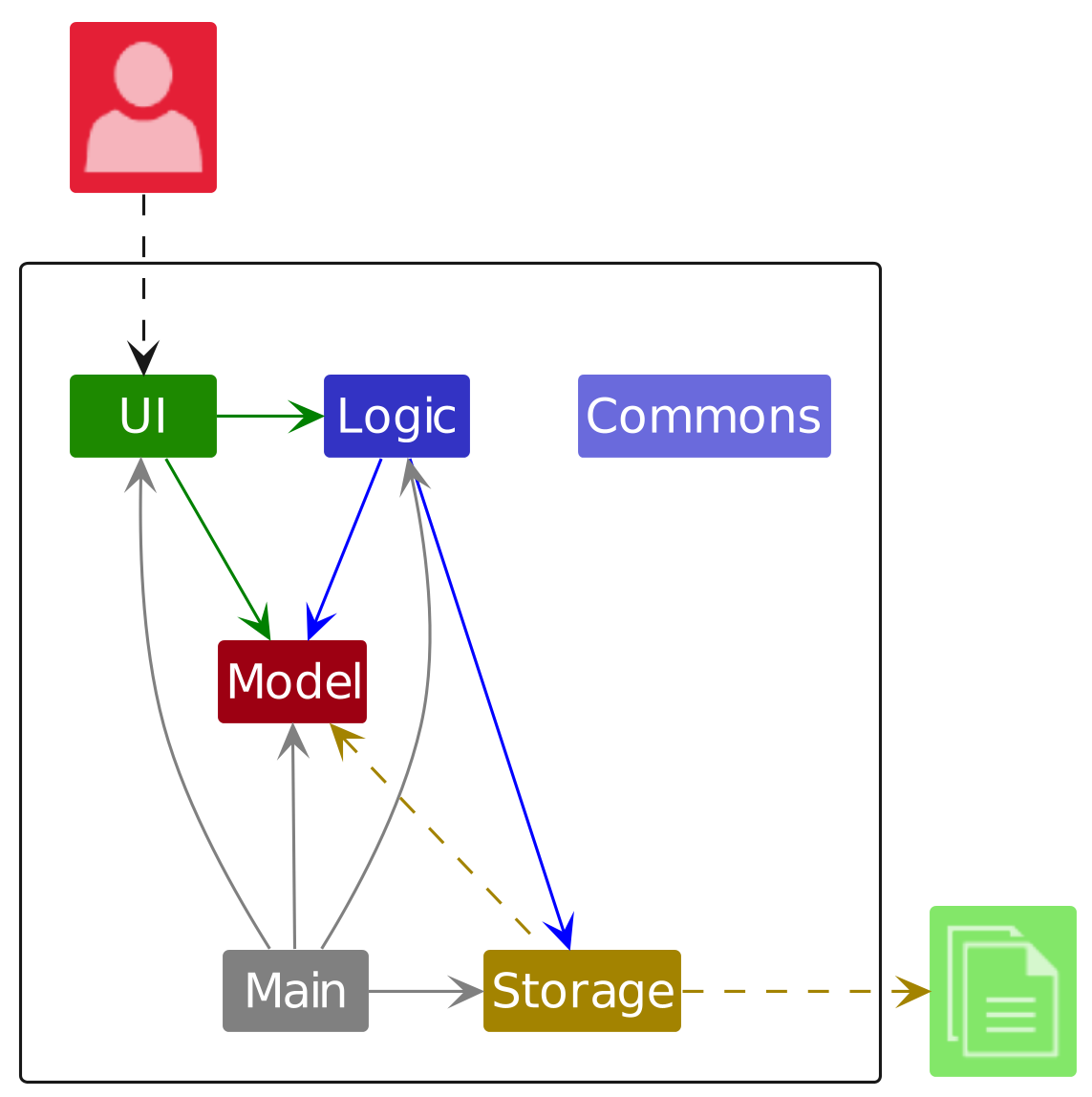
The Architecture Diagram given above explains the high-level design of the App.
Given below is a quick overview of main components and how they interact with each other.
Main components of the architecture
Main (consisting of classes Main and MainApp) is in charge of the app launch and shut down.
- At app launch, it initializes the other components in the correct sequence, and connects them up with each other.
- At shut down, it shuts down the other components and invokes cleanup methods where necessary.
The bulk of the app's work is done by the following four components:
UI: The UI of the App.Logic: The command executor.Model: Holds the data of the App in memory.Storage: Reads data from, and writes data to, the hard disk.
Commons represents a collection of classes used by multiple other components.
How the architecture components interact with each other
The Sequence Diagram below shows how the components interact with each other for the scenario where the user issues the command delete i/1.
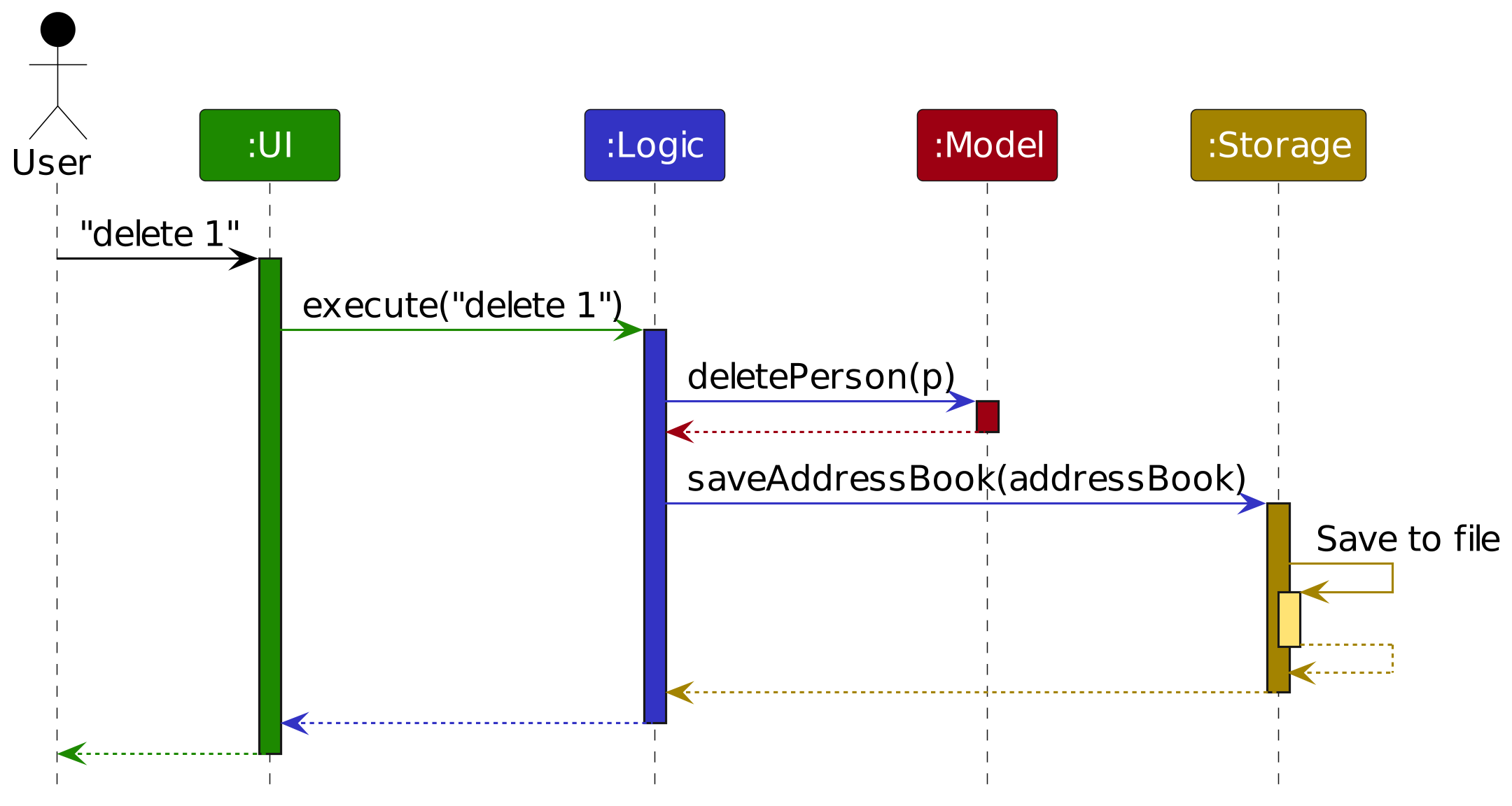
Each of the four main components (also shown in the diagram above),
- defines its API in an
interfacewith the same name as the Component. - implements its functionality using a concrete
{Component Name}Managerclass which follows the corresponding APIinterfacementioned in the previous point.
For example, the Logic component defines its API in the Logic.java interface and implements its functionality using the LogicManager.java class which follows the Logic interface. Other components interact with a given component through its interface rather than the concrete class (reason: to prevent outside component's being coupled to the implementation of a component), as illustrated in the (partial) class diagram below.
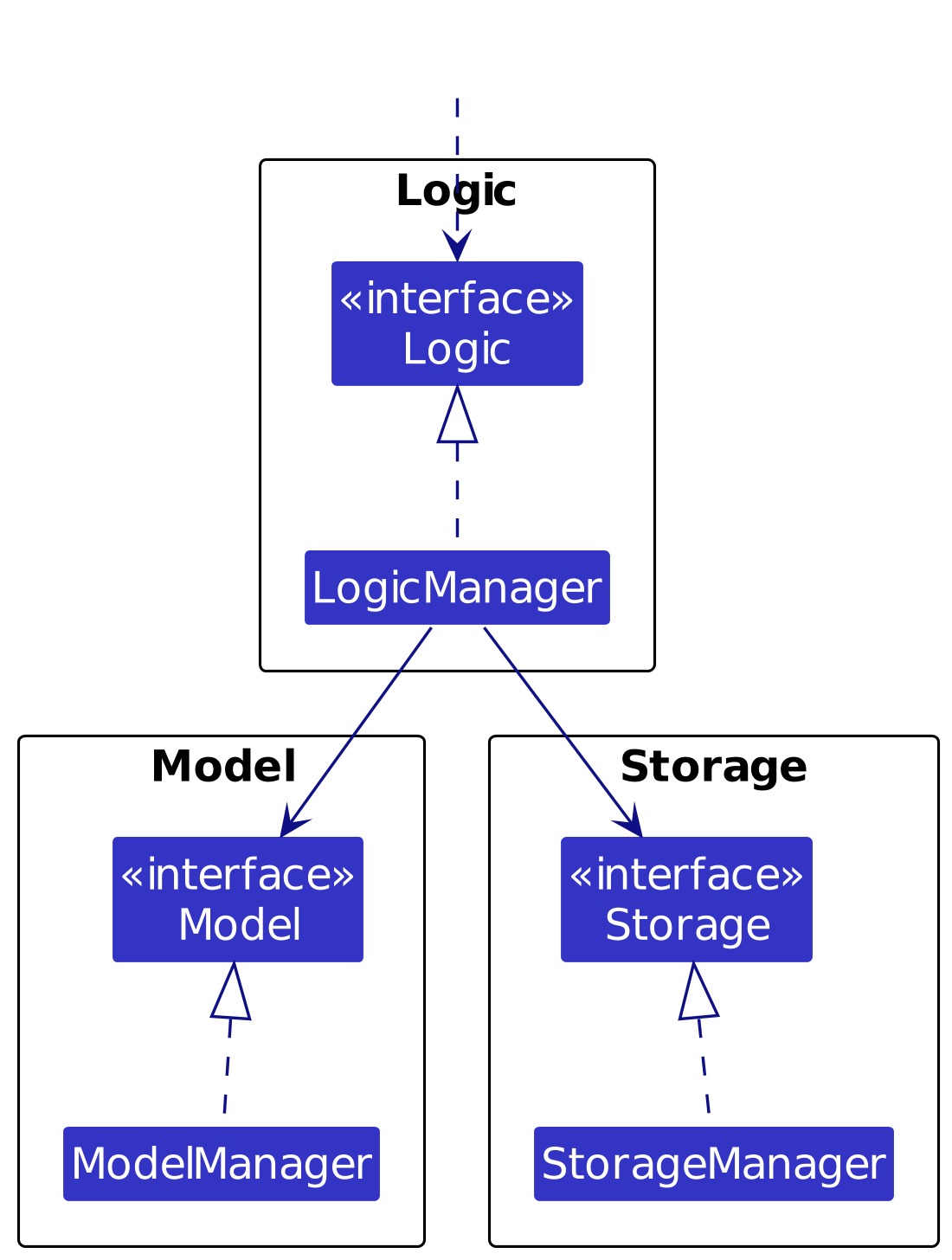
The sections below give more details of each component.
UI component
The API of this component is specified in Ui.java
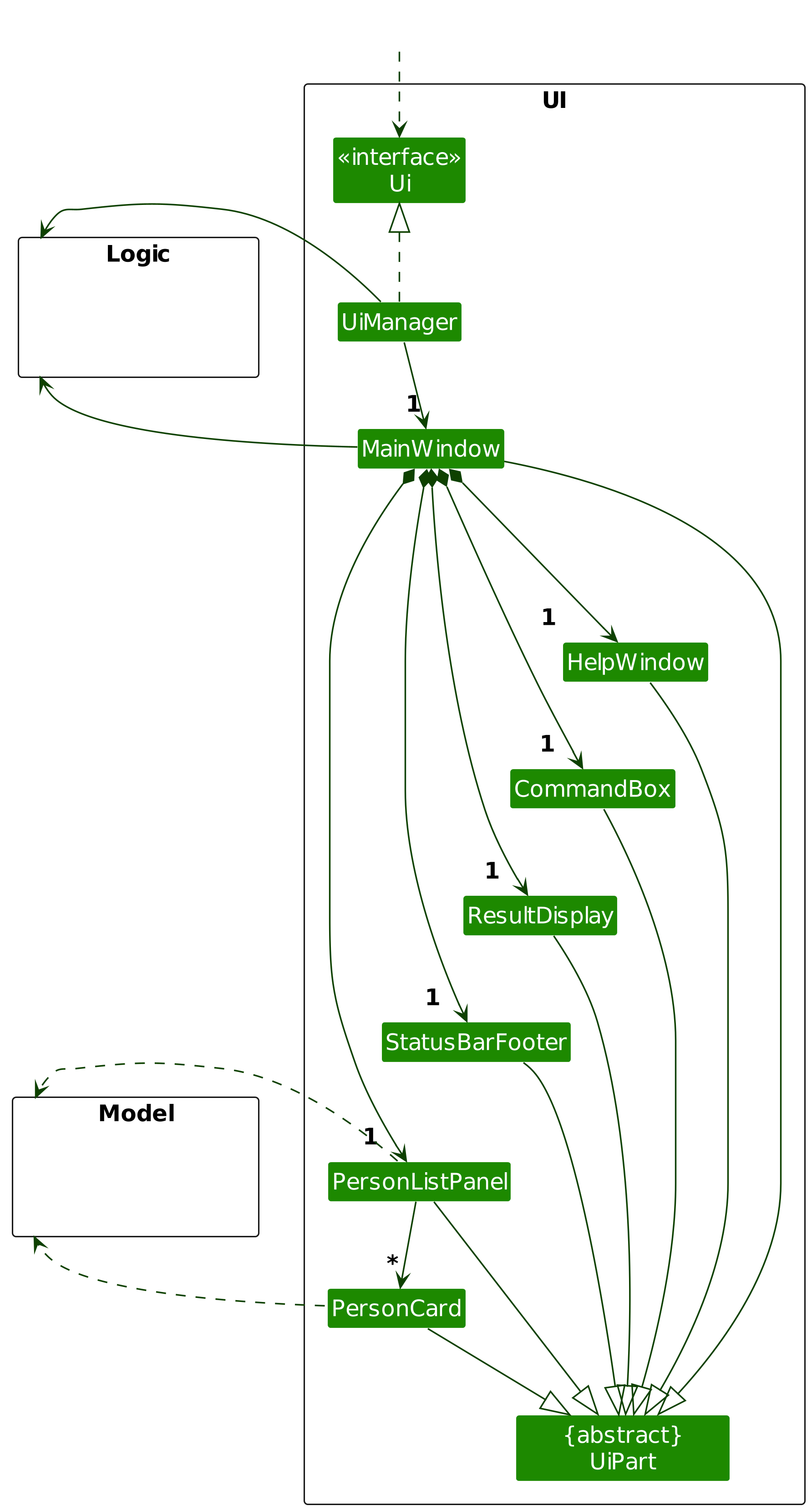
The UI consists of a MainWindow that is made up of parts e.g.CommandBox, ResultDisplay, PersonListPanel, StatusBarFooter etc. All these, including the MainWindow, inherit from the abstract UiPart class which captures the commonalities between classes that represent parts of the visible GUI.
The UI component uses the JavaFx UI framework. The layout of these UI parts are defined in matching .fxml files that are in the src/main/resources/view folder. For example, the layout of the MainWindow is specified in MainWindow.fxml
The UI component,
- executes user commands using the
Logiccomponent. - listens for changes to
Modeldata so that the UI can be updated with the modified data. - keeps a reference to the
Logiccomponent, because theUIrelies on theLogicto execute commands. - depends on some classes in the
Modelcomponent, as it displaysPersonobject residing in theModel.
Logic component
API : Logic.java
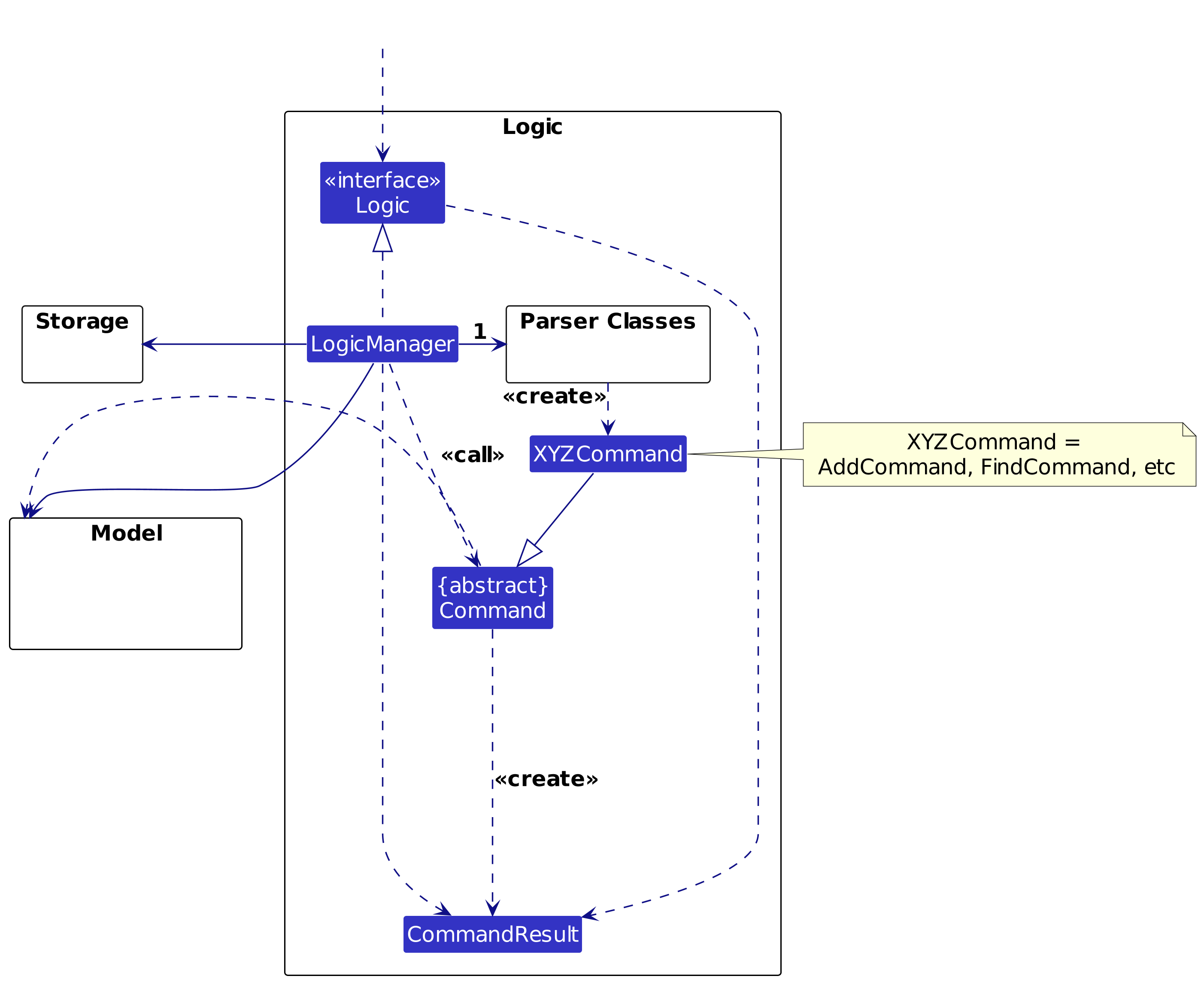
Here's a (partial) class diagram of the Logic component:
The sequence diagram below illustrates the interactions within the Logic component, taking execute("delete 1") API call as an example.
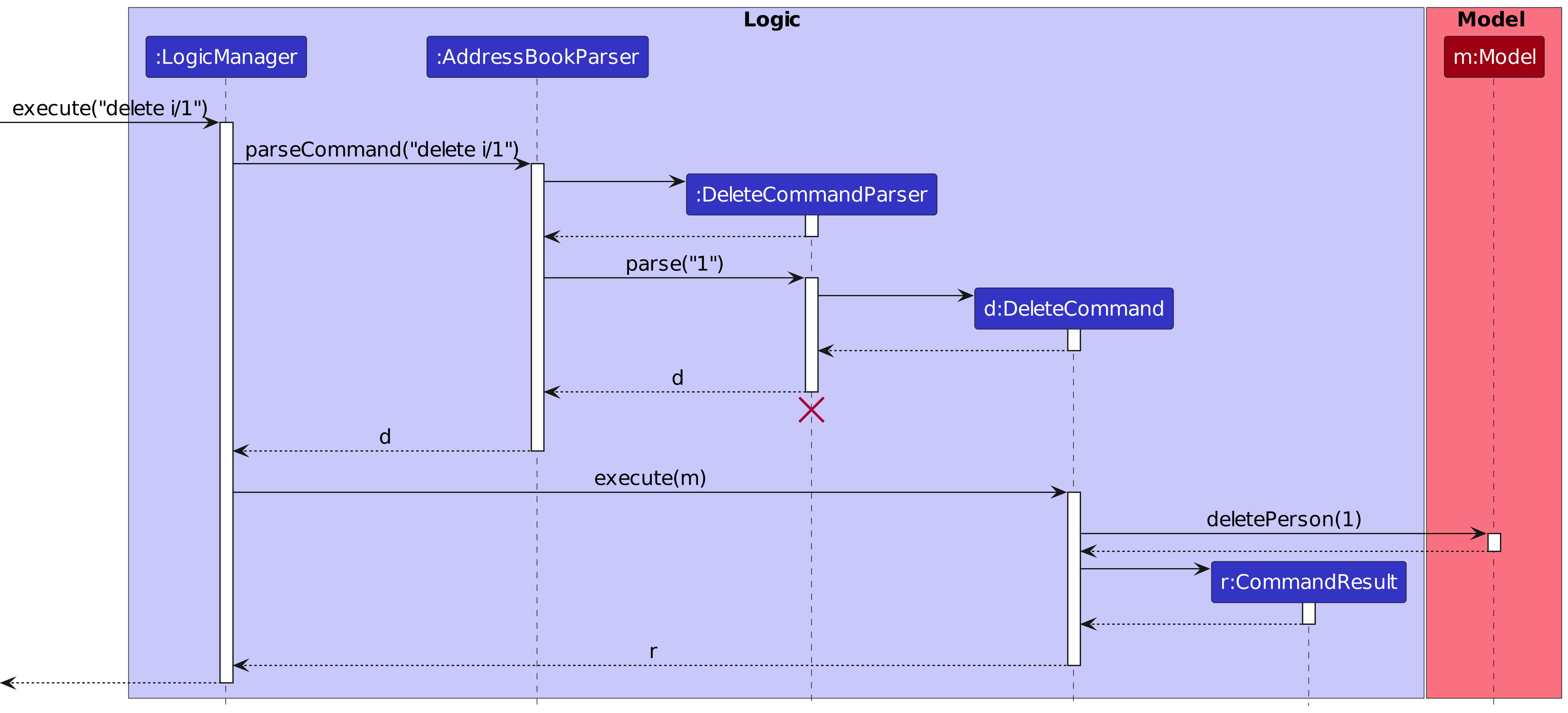
Note: The lifeline for DeleteCommandParser should end at the destroy marker (X) but due to a limitation of PlantUML, the lifeline continues till the end of diagram.
How the Logic component works:
- When
Logicis called upon to execute a command, it is passed to anAddressBookParserobject which in turn creates a parser that matches the command (e.g.,DeleteCommandParser) and uses it to parse the command. - This results in a
Commandobject (more precisely, an object of one of its subclasses e.g.,DeleteCommand) which is executed by theLogicManager. - The command can communicate with the
Modelwhen it is executed (e.g. to delete a person).
Note that although this is shown as a single step in the diagram above (for simplicity), in the code it can take several interactions (between the command object and theModel) to achieve. - The result of the command execution is encapsulated as a
CommandResultobject which is returned back fromLogic.
Here are the other classes in Logic (omitted from the class diagram above) that are used for parsing a user command:
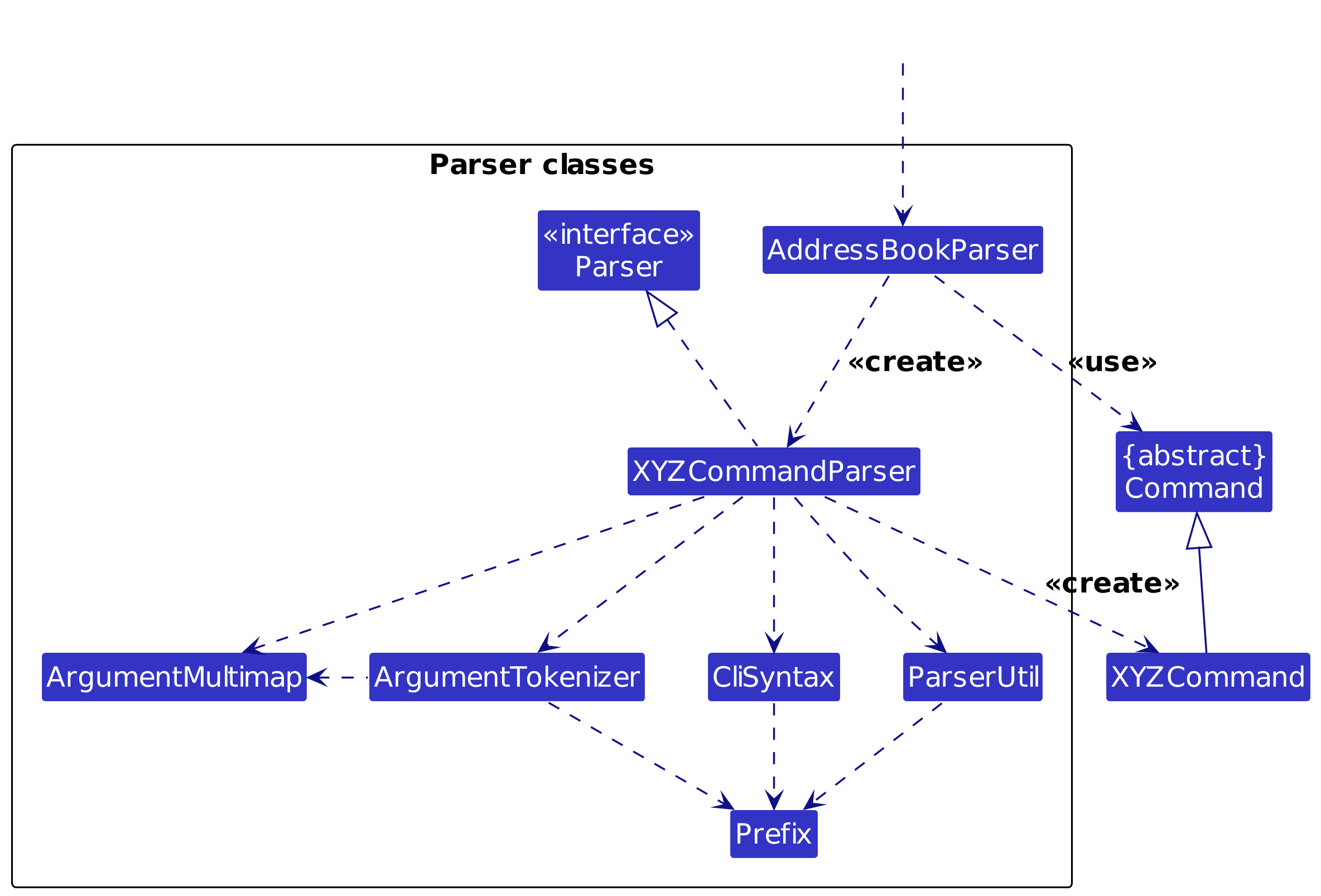
How the parsing works:
- When called upon to parse a user command, the
AddressBookParserclass creates anXYZCommandParser(XYZis a placeholder for the specific command name e.g.,AddCommandParser) which uses the other classes shown above to parse the user command and create aXYZCommandobject (e.g.,AddCommand) which theAddressBookParserreturns back as aCommandobject. - All
XYZCommandParserclasses (e.g.,AddCommandParser,DeleteCommandParser, ...) inherit from theParserinterface so that they can be treated similarly where possible e.g, during testing.
Model component
API : Model.java
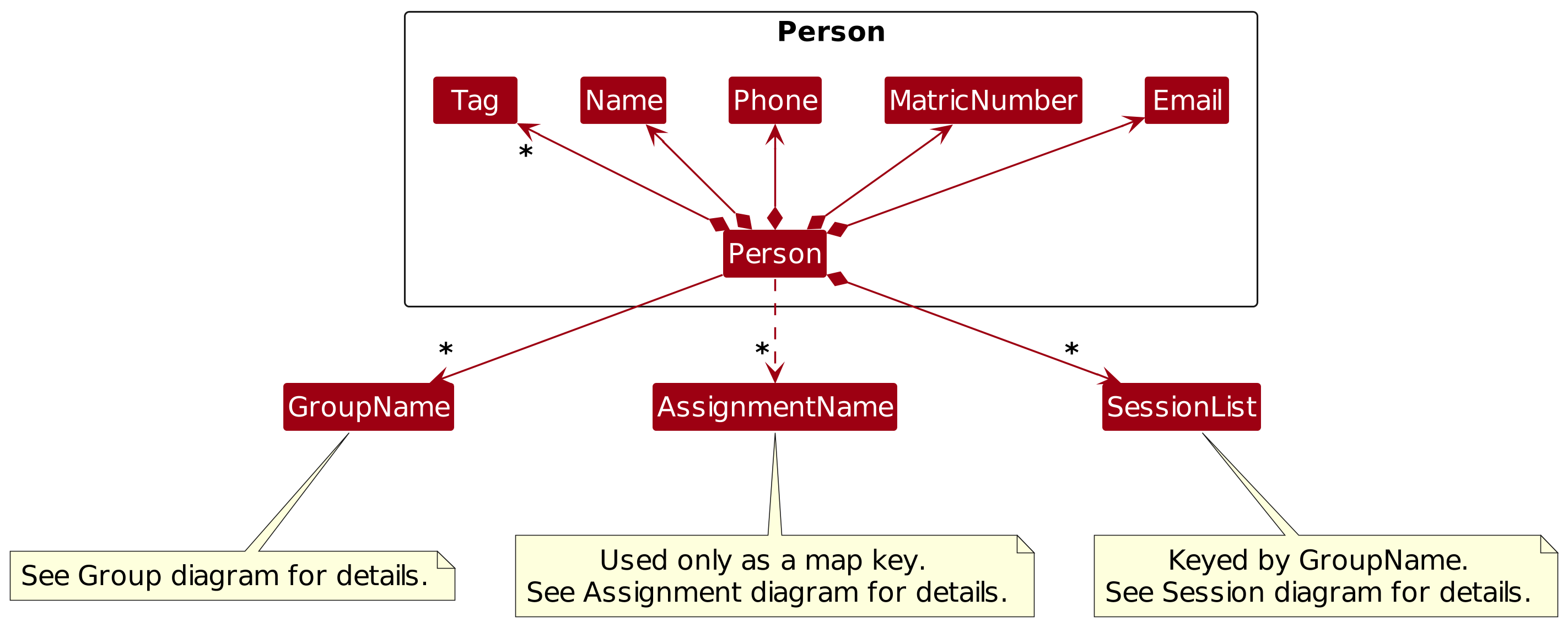
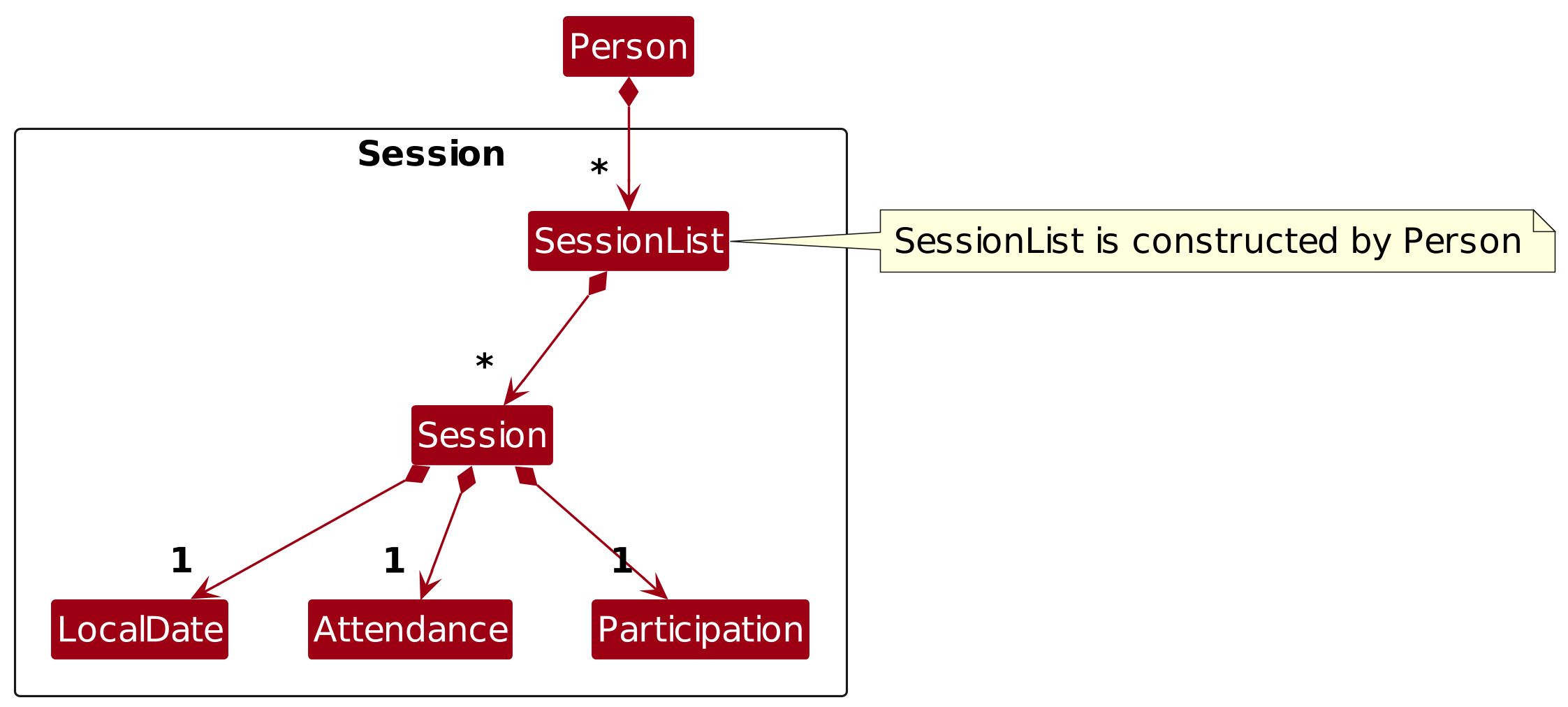 | 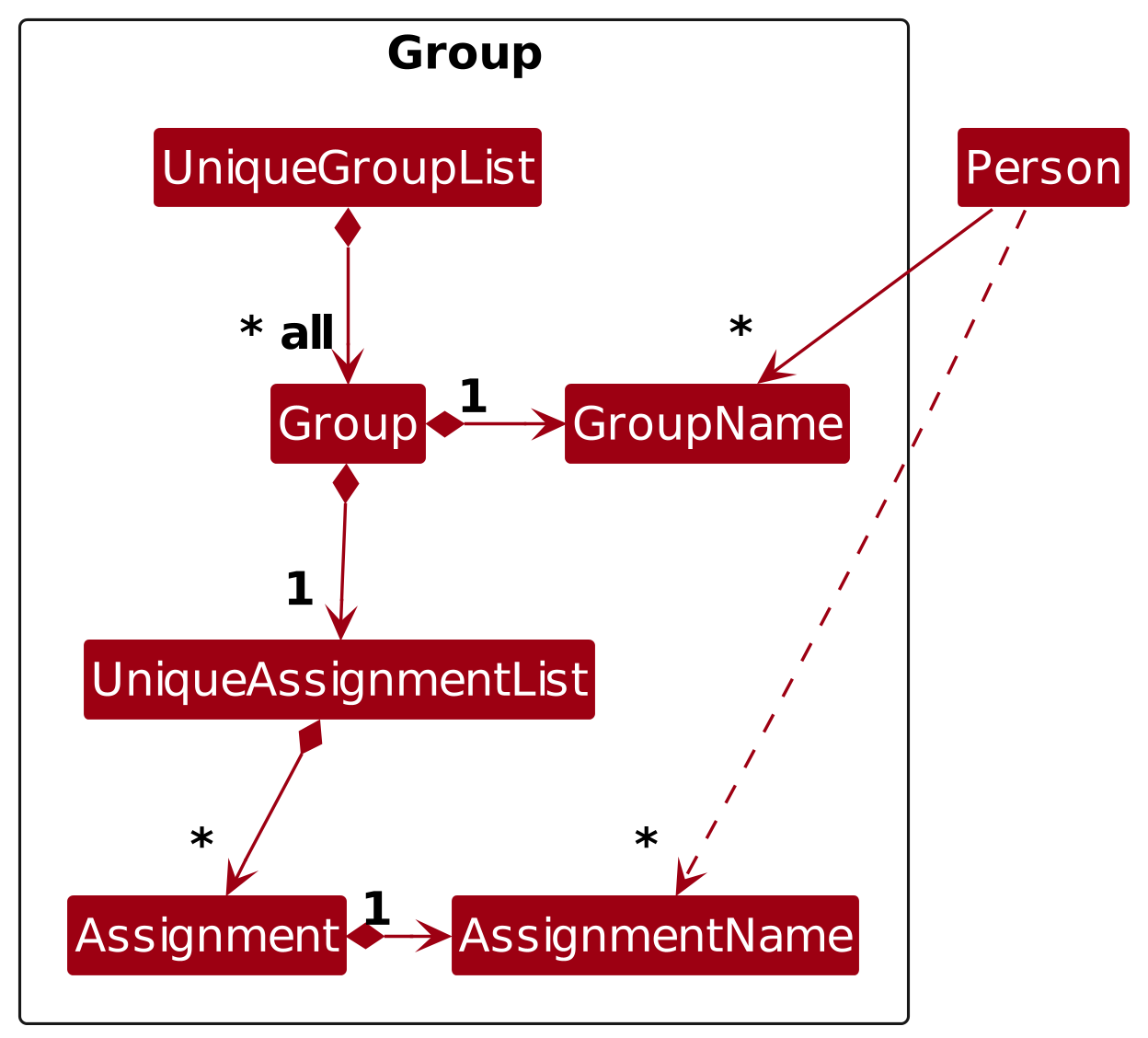 |
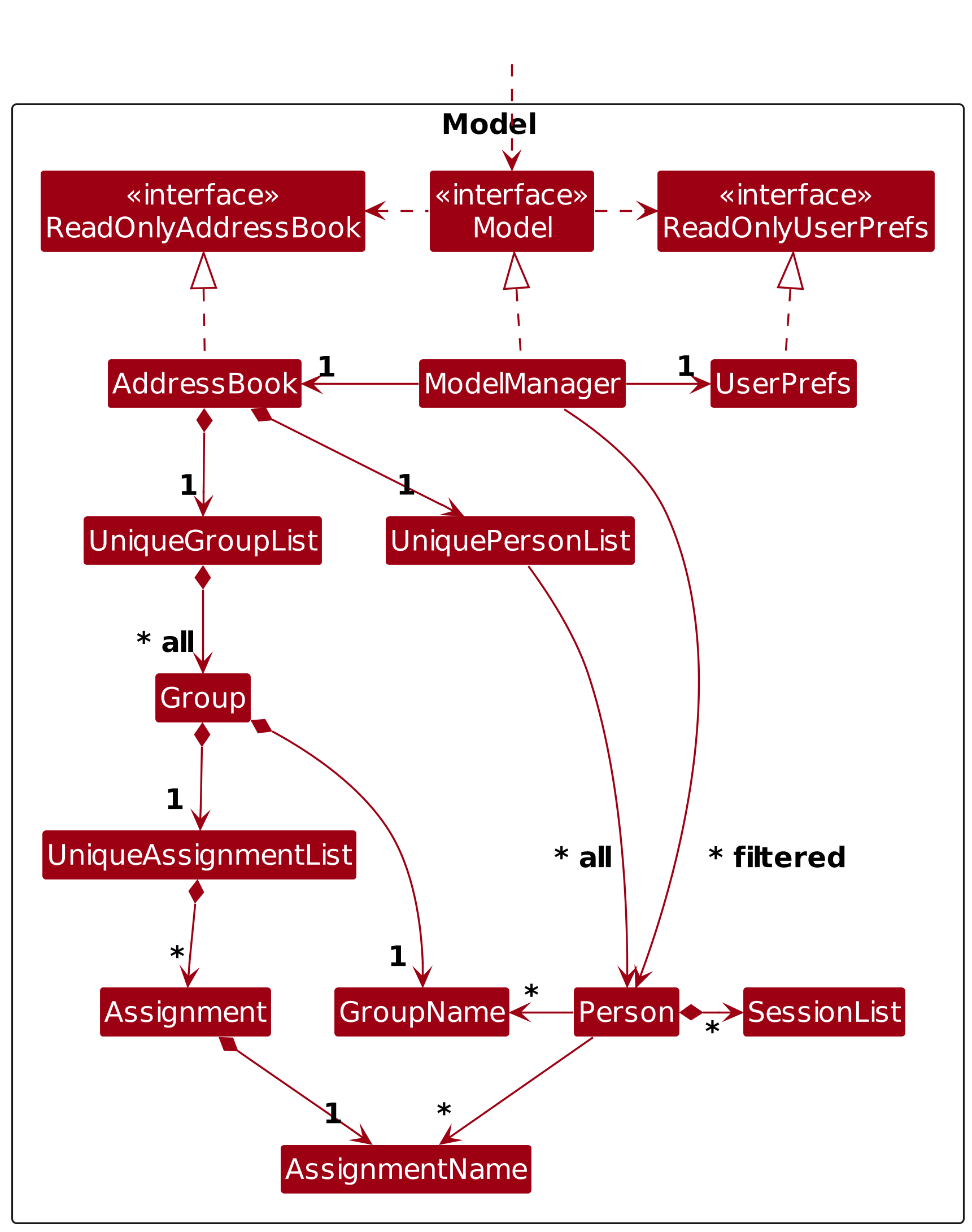
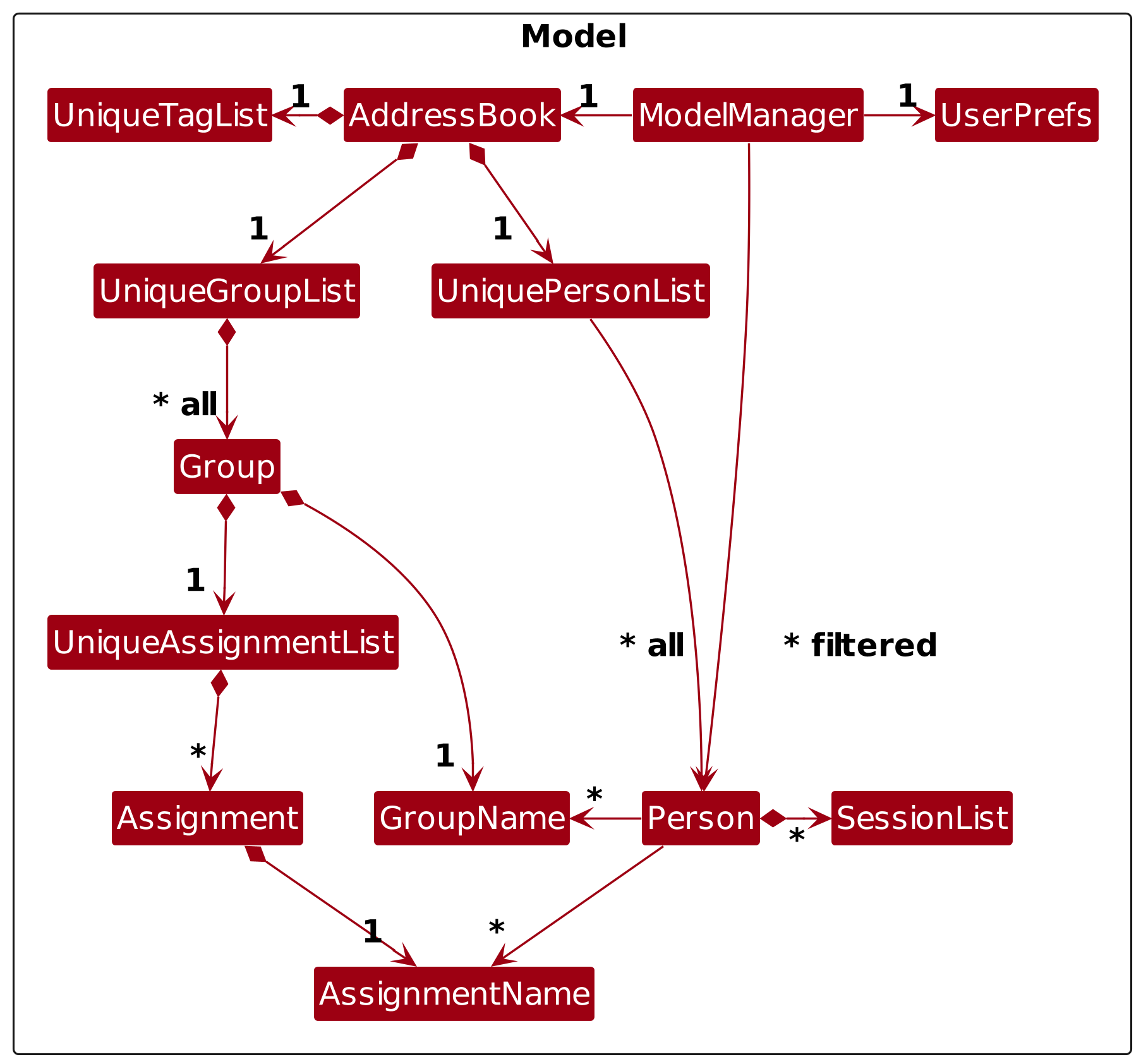
The Model component,
- stores the address book data i.e., all
Personobjects (which are contained in aUniquePersonListobject) and allGroupobjects (which are contained in aUniqueGroupListobject). - stores each
Group's assignments (allAssignmentobjects which are contained in aUniqueAssignmentListobject within eachGroup). - stores the currently 'selected'
Personobjects (e.g., results of a search query) as a separate filtered list which is exposed to outsiders as an unmodifiableObservableList<Person>that can be 'observed' e.g. the UI can be bound to this list so that the UI automatically updates when the data in the list change. - stores each
Person's session data (allSessionobjects, each containing aLocalDate,Attendance, andParticipation, which are contained in aSessionListobject within eachPerson), keyed byGroupNamewith oneSessionListper group. - stores each
Person's assignment grades as a mapping ofGroupNametoAssignmentNameto grade, allowing for per-group assignment grade tracking. - stores a
UserPrefsobject that represents the user’s preferences. This is exposed to the outside as aReadOnlyUserPrefsobject. - does not depend on any of the other three components (as the
Modelrepresents data entities of the domain, they should make sense on their own without depending on other components)
Note: An alternative (arguably, a more OOP) model is given below. It has a Tag list in the AddressBook, which Person references. This allows AddressBook to only require one Tag object per unique tag, instead of each Person needing their own Tag objects.
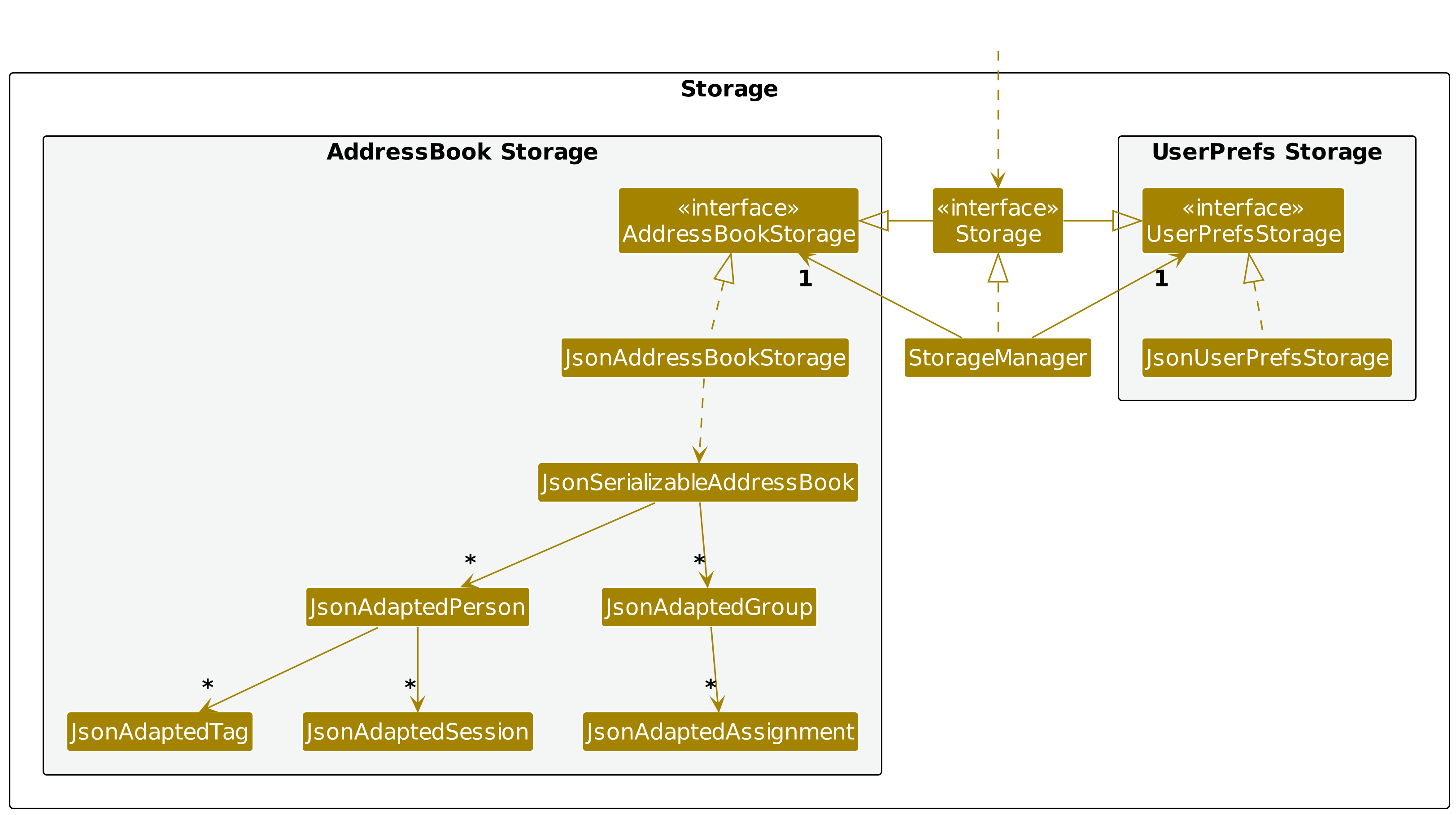
Storage component
API : Storage.java
The sequence diagram below illustrates the interactions within the Storage component when data is loaded during initialization.
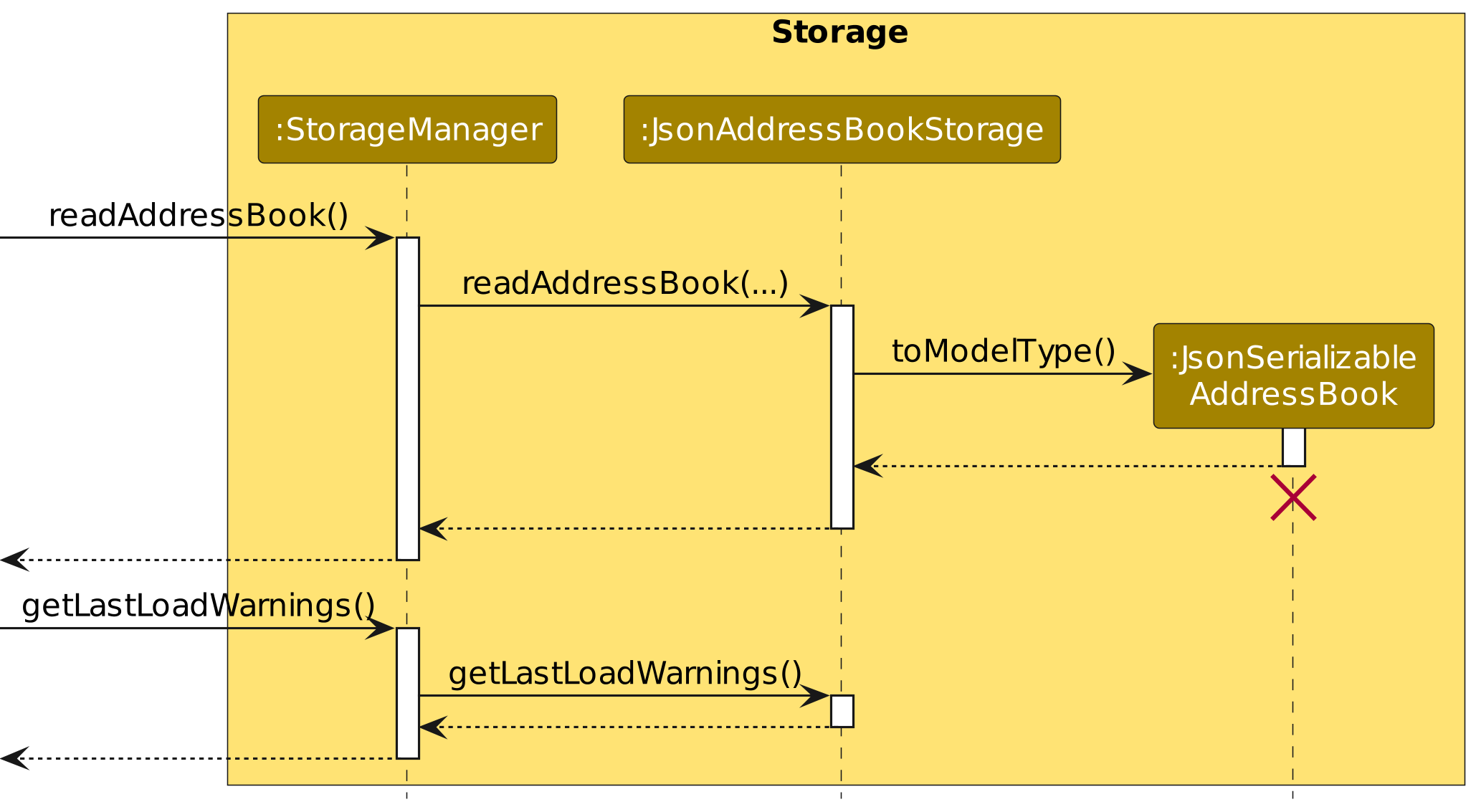
Note: The lifeline for JsonSerializableAddressBook should end at the destroy marker (X) but due to a limitation of PlantUML, the lifeline continues till the end of diagram.
How the load works:
JsonAddressBookStoragedelegates toJsonSerializableAddressBook#toModelType()to parse the JSON data intoModelobjects. During this process, each person and group entry is validated against the current group and assignment data.- Entries with invalid fields, missing group references, or inconsistent assignment grades are skipped rather than causing the entire load to fail. The app continues loading with the remaining valid entries.
- Skipped entries are preserved back into the data file on the next save, so no data is permanently lost. Warnings generated during this process are retrieved via
StorageManager#getLastLoadWarnings()and displayed to the user on startup. - Previously skipped entries are re-attempted on every subsequent load. If the underlying issue has been resolved (e.g., a missing group was manually added back to the file), the entry will be successfully loaded on the next launch.
- If the data file is blank or empty, the app loads sample data instead. If the file contains malformed JSON, the app starts with an empty address book and blocks all saves for that session to prevent overwriting the original file.
The Storage component,
- can save both address book data and user preference data in JSON format, and read them back into corresponding objects.
- inherits from both
AddressBookStorageandUserPrefStorage, which means it can be treated as either one (if only the functionality of only one is needed). - depends on some classes in the
Modelcomponent (because theStoragecomponent's job is to save/retrieve objects that belong to theModel)
Common classes
Classes used by multiple components are in the seedu.address.commons package.
Implementation
This section describes some noteworthy details on how certain features are implemented.
Matric number validation
The algorithm can be found here.
Format: Valid matric number has form of A, followed by 7 digits (
The checksum calculation is done by MatricNumber#calculateChecksum(String matricNumber).
The checksum letter is one of the following 13 letters: Y X W U R N M L J H E A B.
Step 1. Extract digits
Step 2. Compute the sum of the 6 digits above.
Step 3. Map the remainder to a checksum letter by computing remainder = sum % 13.
| remainder | 0 | 1 | 2 | 3 | 4 | 5 | 6 | 7 | 8 | 9 | 10 | 11 | 12 |
|---|---|---|---|---|---|---|---|---|---|---|---|---|---|
| Letter | Y | X | W | U | R | N | M | L | J | H | E | A | B |
Examples:
The table below shows one matric number that produces each of the 13 possible check letters.
| Matric number | Digits d2–d7 | Digit sum | mod 13 | Check letter |
|---|---|---|---|---|
A0308002Y | 0,3,0,8,0,2 | 13 | 0 | Y |
A0308003X | 0,3,0,8,0,3 | 14 | 1 | X |
A0308004W | 0,3,0,8,0,4 | 15 | 2 | W |
A0308005U | 0,3,0,8,0,5 | 16 | 3 | U |
A0308006R | 0,3,0,8,0,6 | 17 | 4 | R |
A0308007N | 0,3,0,8,0,7 | 18 | 5 | N |
A0308008M | 0,3,0,8,0,8 | 19 | 6 | M |
A0308009L | 0,3,0,8,0,9 | 20 | 7 | L |
A0308019J | 0,3,0,8,1,9 | 21 | 8 | J |
A0308029H | 0,3,0,8,2,9 | 22 | 9 | H |
A0308039E | 0,3,0,8,3,9 | 23 | 10 | E |
A0308000A | 0,3,0,8,0,0 | 11 | 11 | A |
A0308001B | 0,3,0,8,0,1 | 12 | 12 | B |
Command Tab Completion Feature
The command tab completion feature provides real-time command suggestions and contextual parameter help as the user types, with the ability to accept suggestions via the TAB key.
How It Works
The feature leverages three key components:
- CommandRegistry - A centralized registry containing all available commands and their parameters help-string
- CommandBox (UI) - The input component that listens to user input and manages suggestion display
- Ghost Text Label - A visual overlay showing faded suggestions for intuitive completion
The architecture works as follows:
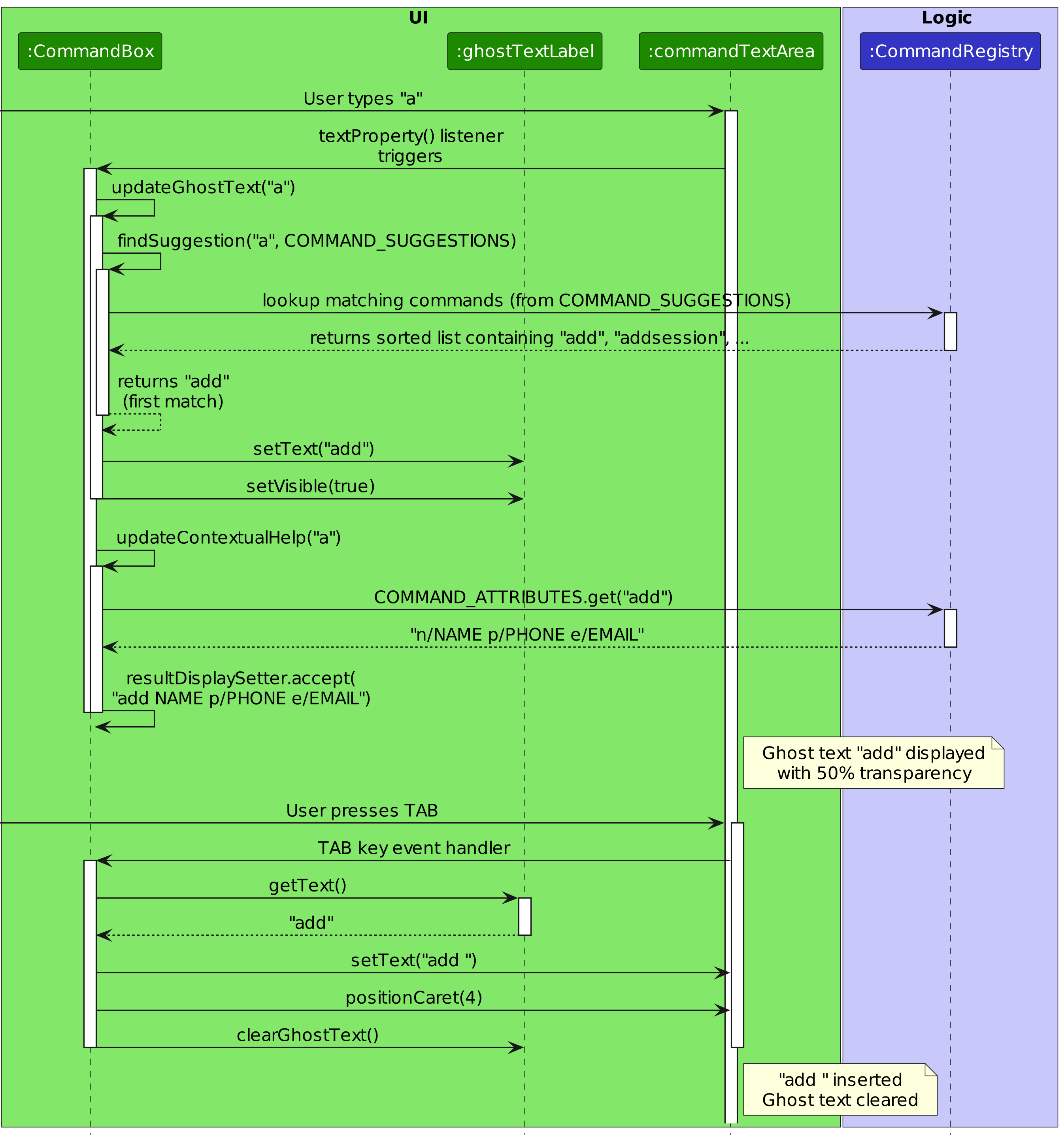
Detailed Flow
Step 1: Initialization
- When
CommandBoxis created, it extracts all command words fromCommandRegistry.COMMAND_ATTRIBUTESand creates a sorted list ofCOMMAND_SUGGESTIONS
Step 2: User Types
- As the user types in the
TextArea, a text change listener triggers two updates:updateGhostText(): Finds and displays matching command suggestions as faded textupdateContextualHelp(): Shows command parameters in the result display panel
Step 3: Ghost Text Generation
- The
findSuggestion()method performs a prefix match againstCOMMAND_SUGGESTIONS - The first matching command (e.g., typing "a" returns "add") is displayed in the
ghostTextLabelwith semi-transparent styling - The suggestion is cleared if the input contains spaces or multiple words
Step 4: TAB Key Completion
- When the user presses TAB, the current ghost text suggestion is inserted into the command box
- A space is automatically appended, positioning the cursor for parameter entry
- The ghost text is cleared
Step 5: Contextual Help
- The
updateContextualHelp()method extracts the command word and looks up its parameters inCommandRegistry - Parameters (e.g., "NAME p/PHONE e/EMAIL") are displayed in the result display area
- When the user clears the command or switches commands, the previously displayed text is restored
Class Diagram
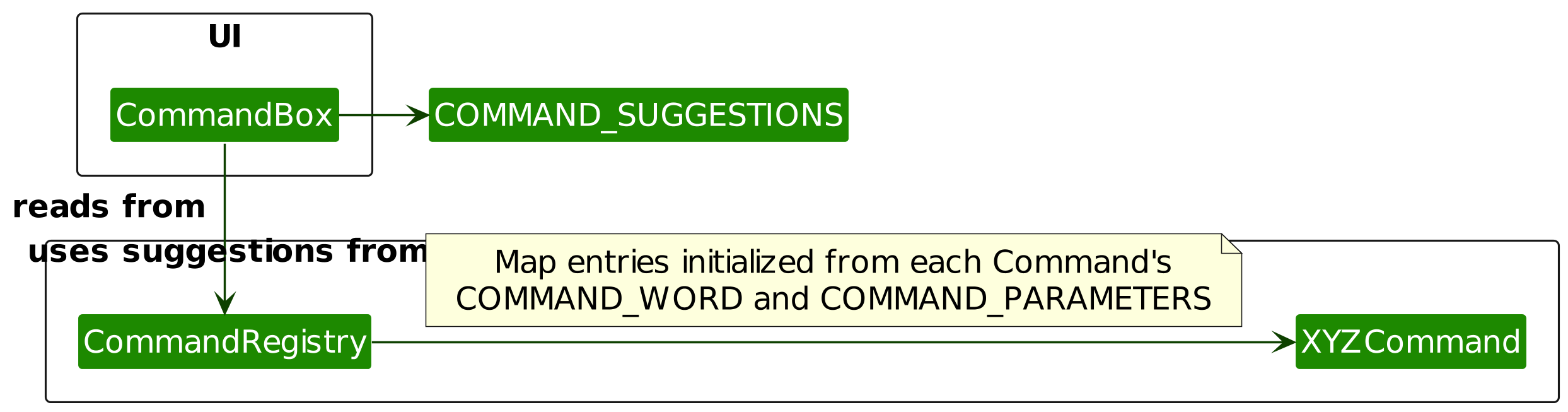
Design Considerations
Aspect: Where to store command metadata
Option 1 (current choice): Use a centralized
CommandRegistrywith a staticCOMMAND_ATTRIBUTESmap- Pros: Easy to maintain; single source of truth; decoupled from UI
- Cons: Requires manual registration of each command (risk of developer error); slight overhead from map lookups
Option 2: Store parameters within each Command class
- Pros: Commands are self-documenting; no central registry needed
- Cons: Harder to aggregate suggestions for UI; requires reflection to access static fields
Aspect: Suggestion matching algorithm
Option 1 (current choice): Simple prefix matching (linear search through sorted list)
- Pros: Predictable; easy to understand; fast for small command sets (< 50 commands)
- Cons: Not fuzzy; doesn't handle typos
Option 2: Fuzzy matching with edit distance
- Pros: More forgiving; better user experience for typos
- Cons: More complex; slower for large command sets; may suggest unintended commands
[Proposed] Undo/redo feature
Proposed Implementation
The proposed undo/redo mechanism is facilitated by VersionedAddressBook. It extends AddressBook with an undo/redo history, stored internally as an addressBookStateList and currentStatePointer. Additionally, it implements the following operations:
VersionedAddressBook#commit()— Saves the current address book state in its history.VersionedAddressBook#undo()— Restores the previous address book state from its history.VersionedAddressBook#redo()— Restores a previously undone address book state from its history.
These operations are exposed in the Model interface as Model#commitAddressBook(), Model#undoAddressBook() and Model#redoAddressBook() respectively.
Given below is an example usage scenario and how the undo/redo mechanism behaves at each step.
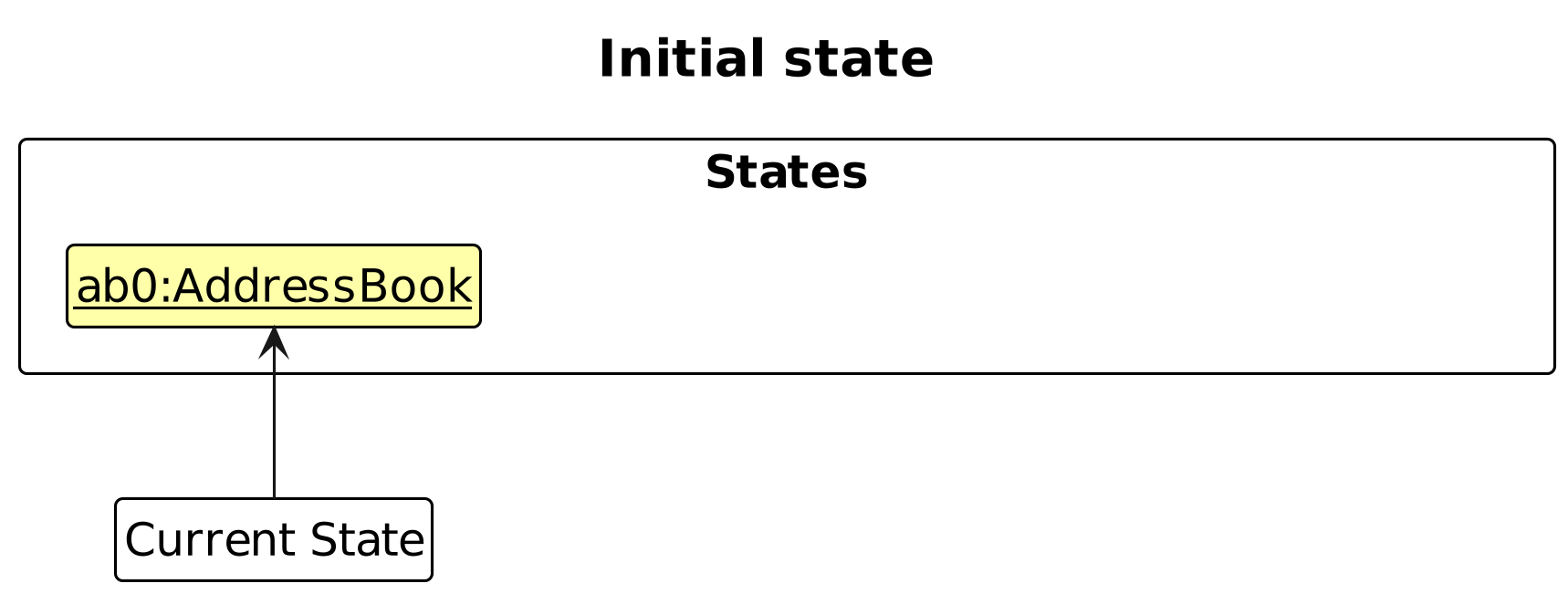
Step 1. The user launches the application for the first time. The VersionedAddressBook will be initialized with the initial address book state, and the currentStatePointer pointing to that single address book state.
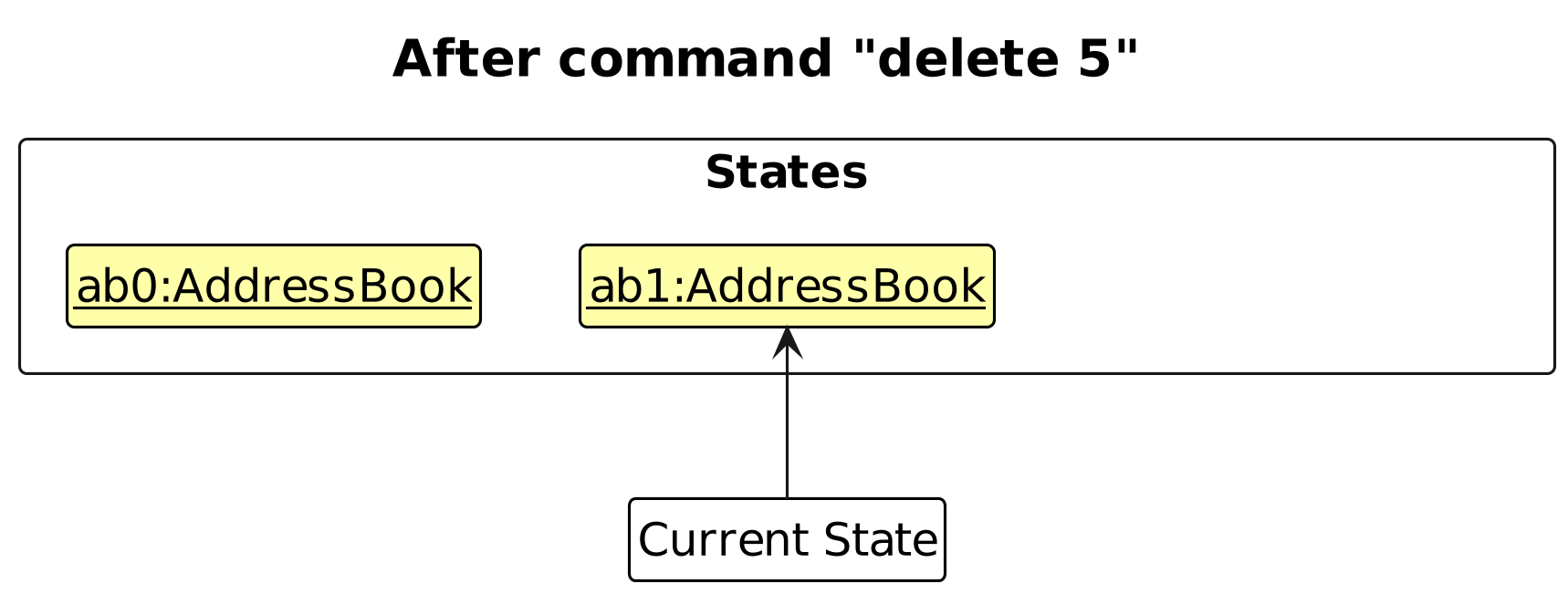
Step 2. The user executes delete 5 command to delete the 5th person in the address book. The delete command calls Model#commitAddressBook(), causing the modified state of the address book after the delete 5 command executes to be saved in the addressBookStateList, and the currentStatePointer is shifted to the newly inserted address book state.
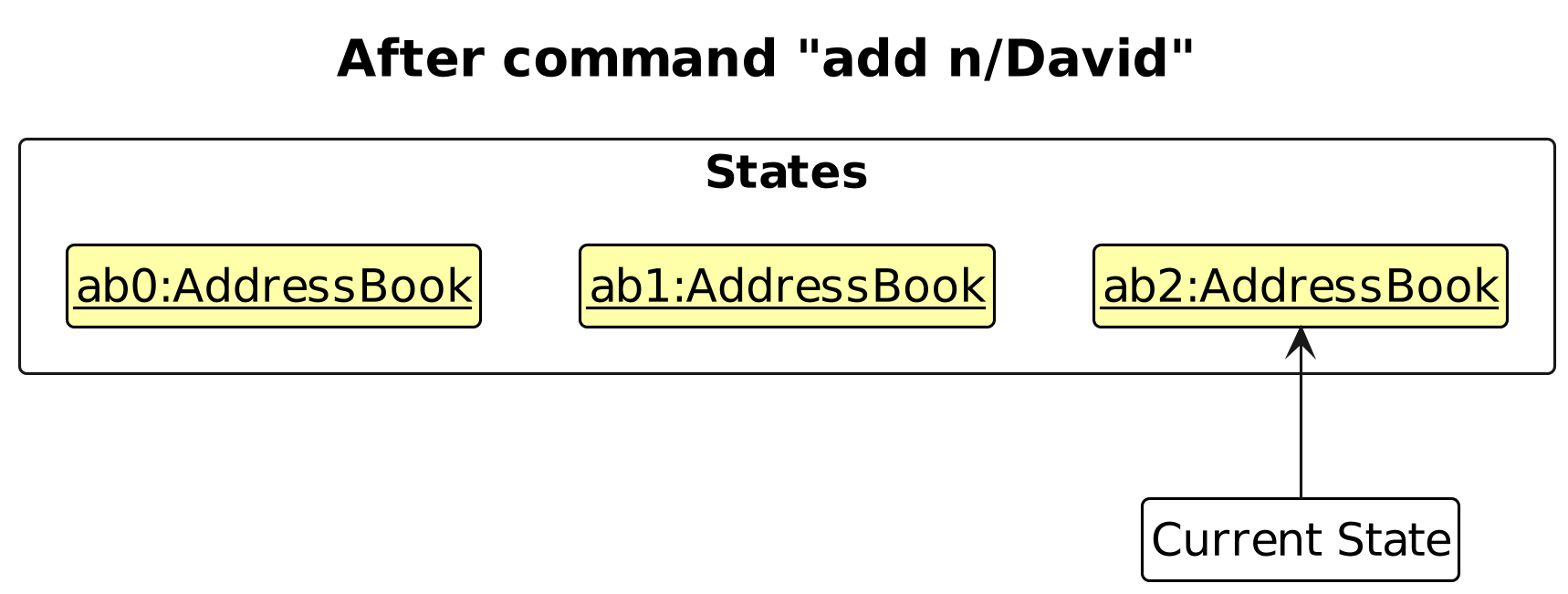
Step 3. The user executes add n/David … to add a new person. The add command also calls Model#commitAddressBook(), causing another modified address book state to be saved into the addressBookStateList.
Note: If a command fails its execution, it will not call Model#commitAddressBook(), so the address book state will not be saved into the addressBookStateList.
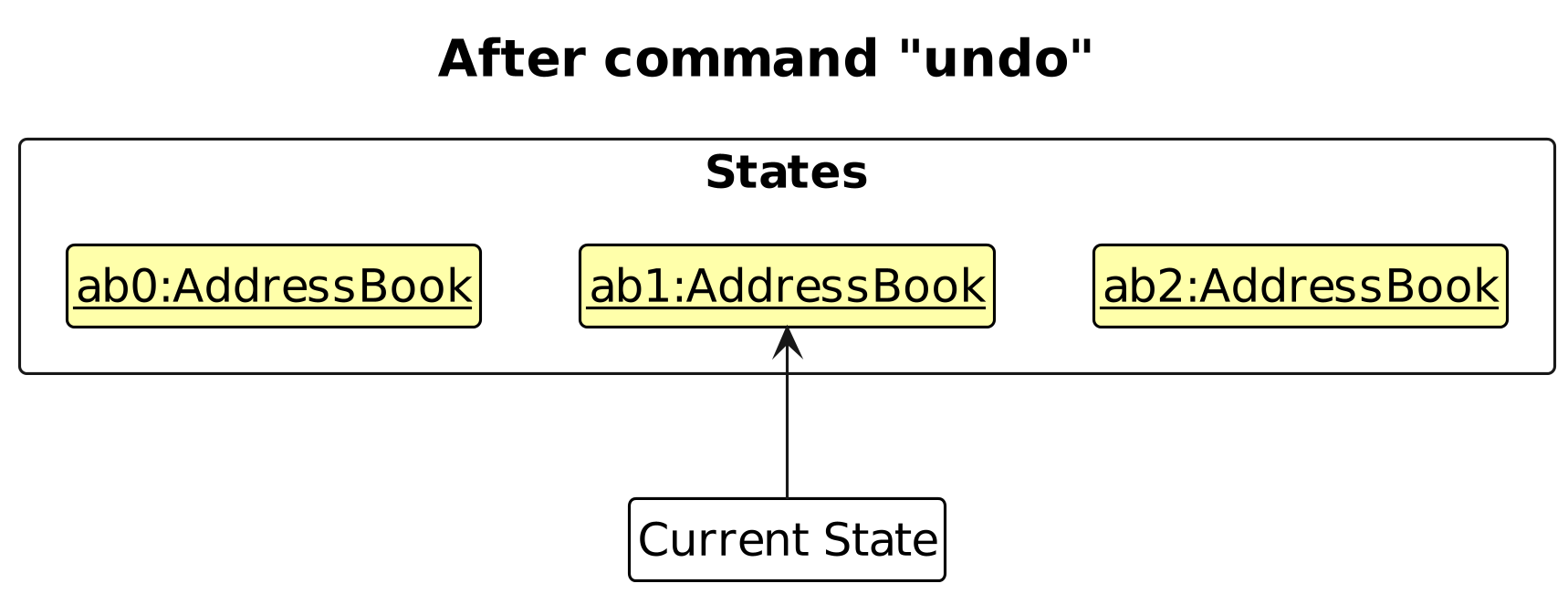
Step 4. The user now decides that adding the person was a mistake, and decides to undo that action by executing the undo command. The undo command will call Model#undoAddressBook(), which will shift the currentStatePointer once to the left, pointing it to the previous address book state, and restores the address book to that state.
Note: If the currentStatePointer is at index 0, pointing to the initial AddressBook state, then there are no previous AddressBook states to restore. The undo command uses Model#canUndoAddressBook() to check if this is the case. If so, it will return an error to the user rather
than attempting to perform the undo.
The following sequence diagram shows how an undo operation goes through the Logic component:
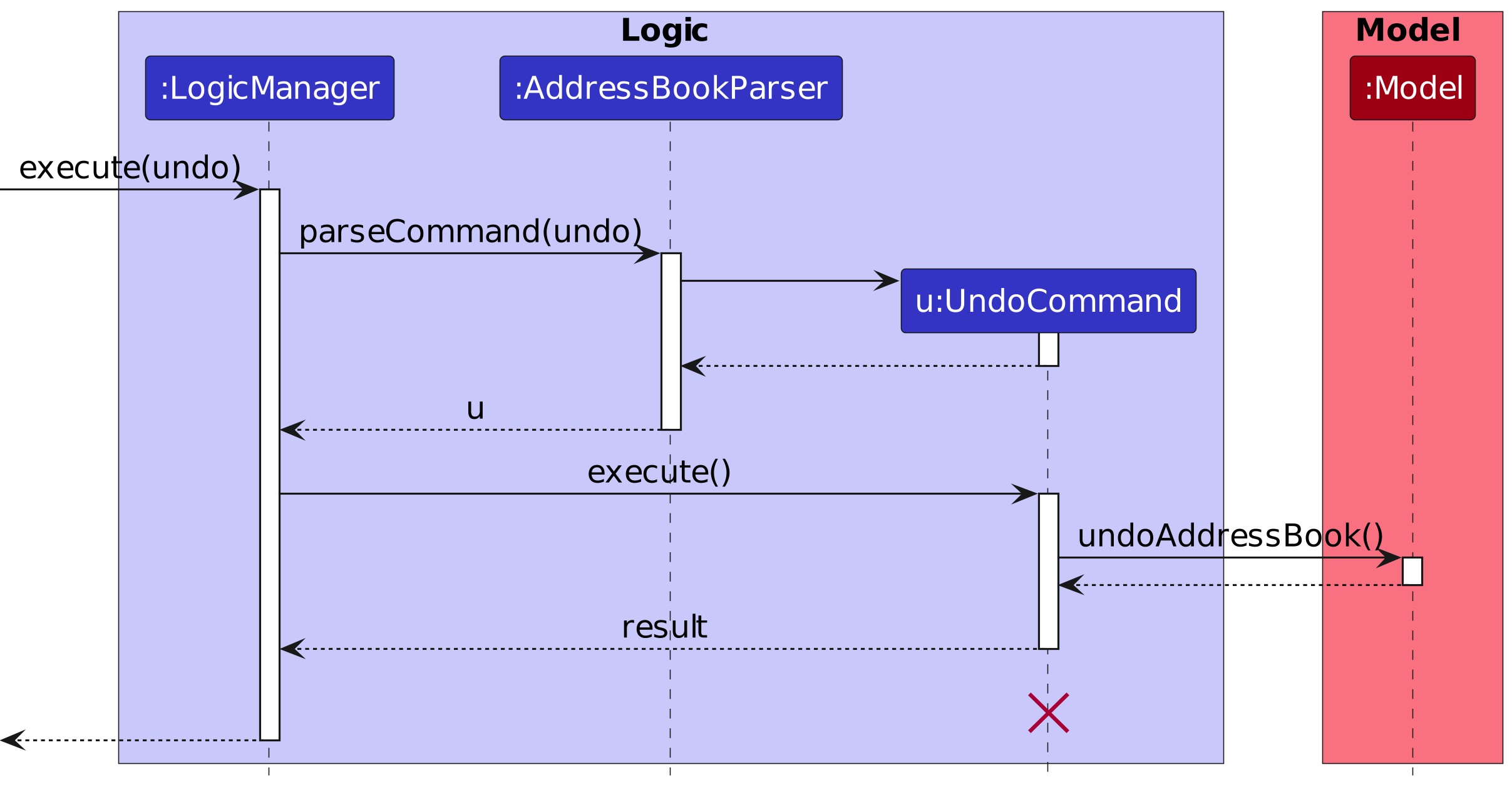
Note: The lifeline for UndoCommand should end at the destroy marker (X) but due to a limitation of PlantUML, the lifeline reaches the end of diagram.
Similarly, how an undo operation goes through the Model component is shown below:
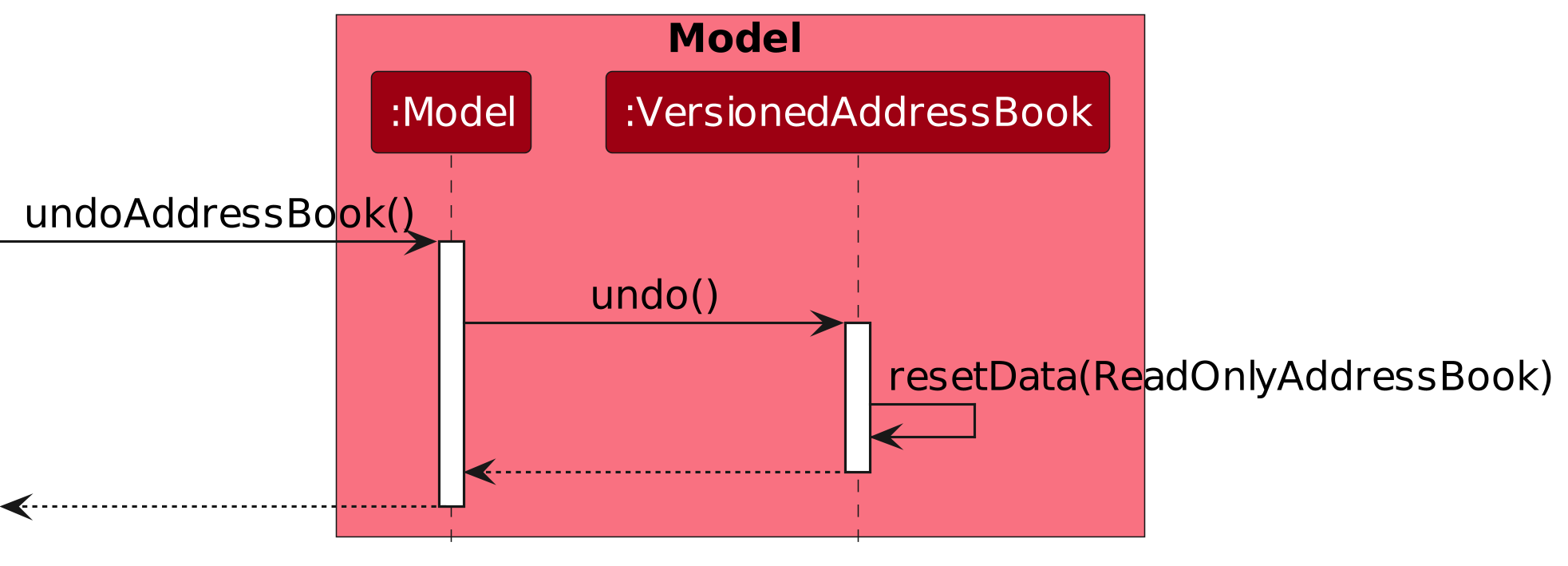
The redo command does the opposite — it calls Model#redoAddressBook(), which shifts the currentStatePointer once to the right, pointing to the previously undone state, and restores the address book to that state.
Note: If the currentStatePointer is at index addressBookStateList.size() - 1, pointing to the latest address book state, then there are no undone AddressBook states to restore. The redo command uses Model#canRedoAddressBook() to check if this is the case. If so, it will return an error to the user rather than attempting to perform the redo.
Step 5. The user then decides to execute the command list. Commands that do not modify the address book, such as list, will usually not call Model#commitAddressBook(), Model#undoAddressBook() or Model#redoAddressBook(). Thus, the addressBookStateList remains unchanged.
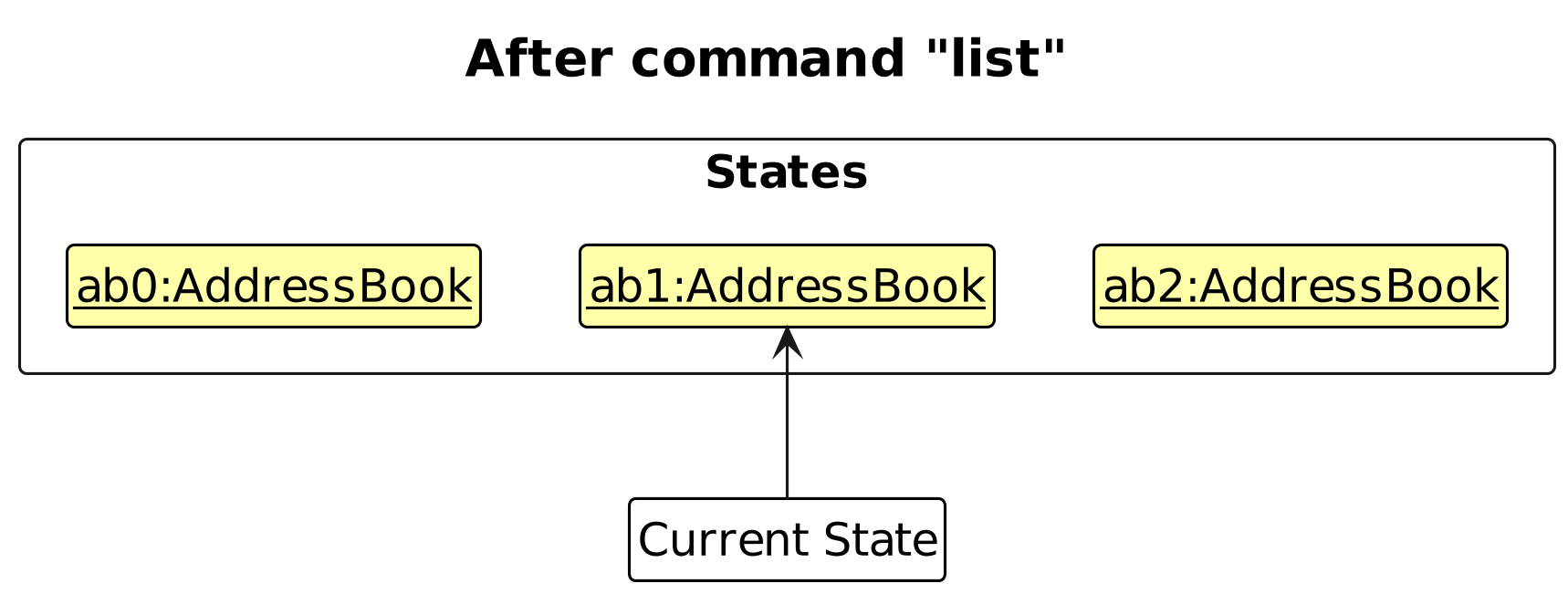
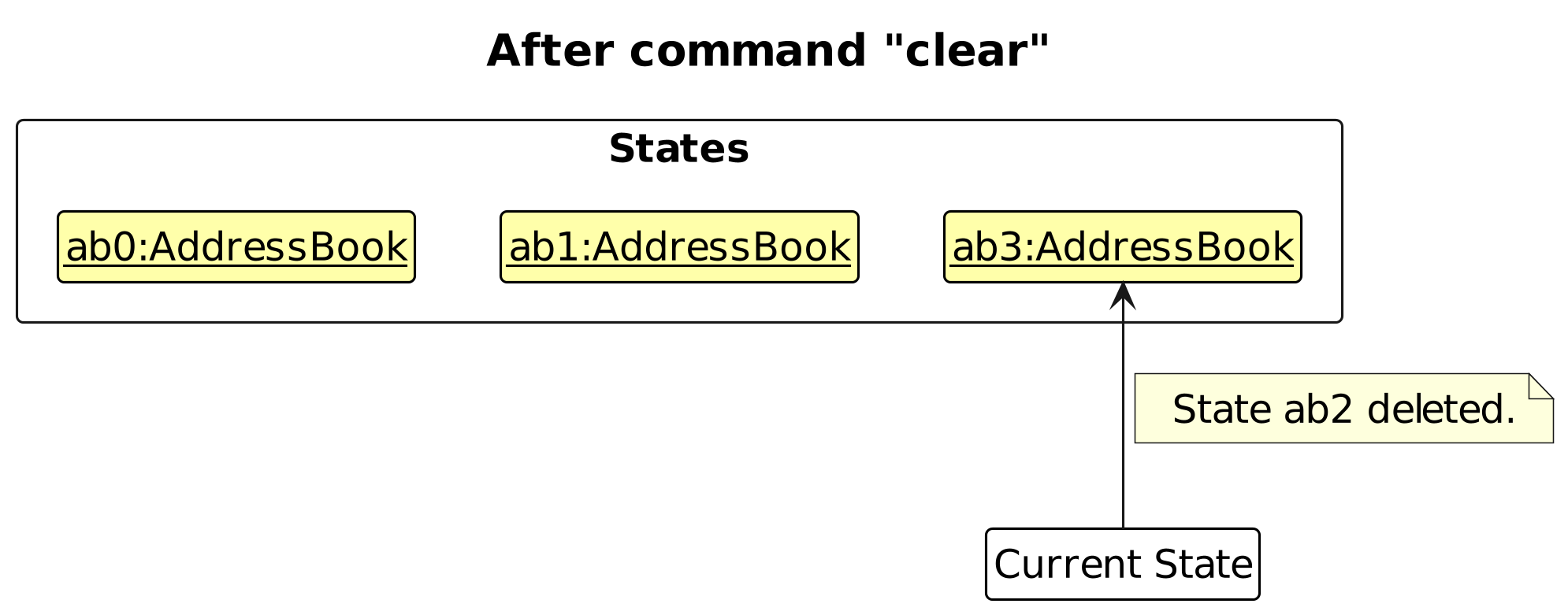
Step 6. The user executes clear, which calls Model#commitAddressBook(). Since the currentStatePointer is not pointing at the end of the addressBookStateList, all address book states after the currentStatePointer will be purged. Reason: It no longer makes sense to redo the add n/David … command. This is the behavior that most modern desktop applications follow.
The following activity diagram summarizes what happens when a user executes a new command:
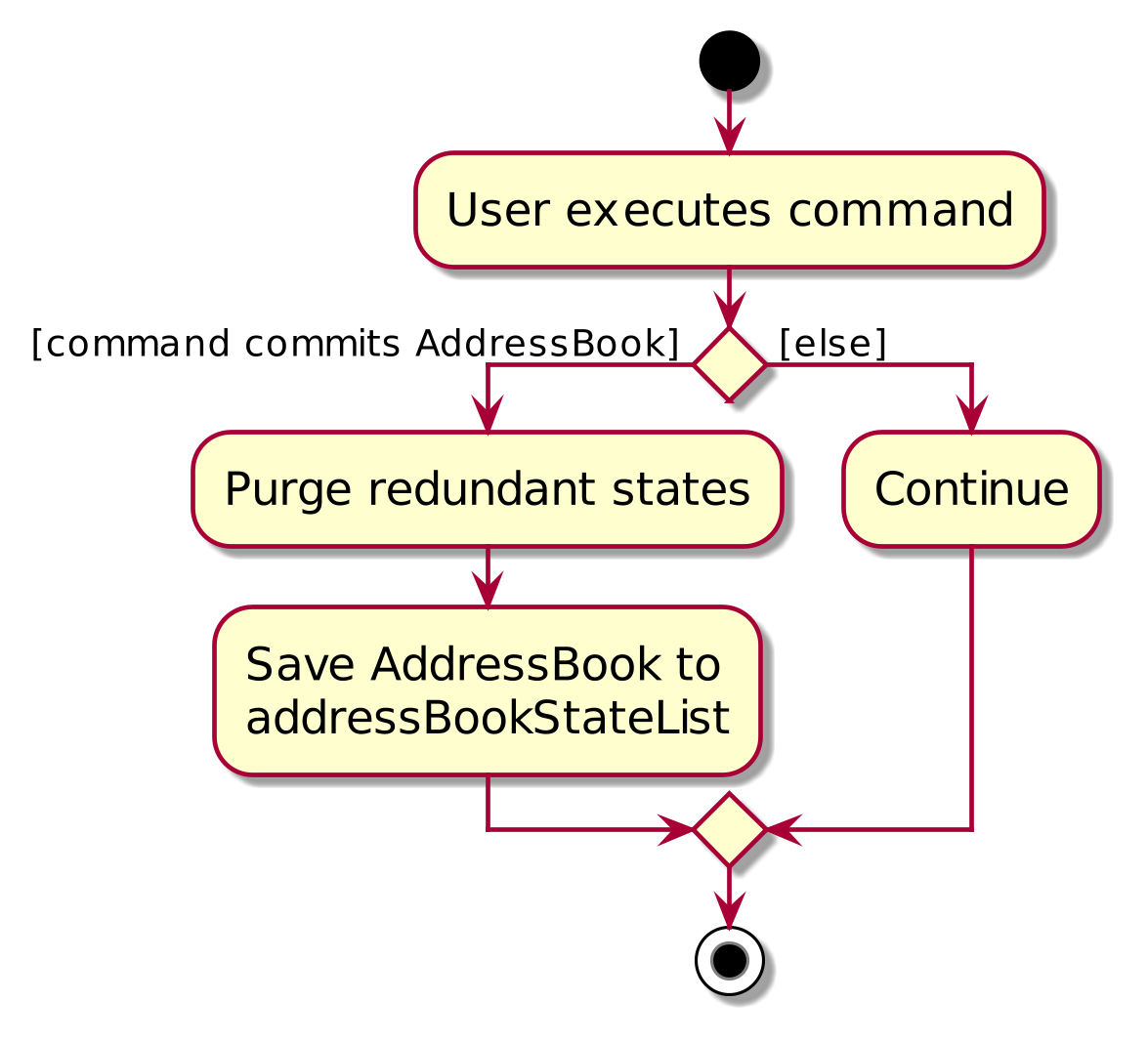
Design considerations:
Aspect: How undo & redo executes:
Alternative 1 (current choice): Saves the entire address book.
- Pros: Easy to implement.
- Cons: May have performance issues in terms of memory usage.
Alternative 2: Individual command knows how to undo/redo by itself.
- Pros: Will use less memory (e.g. for
delete, just save the person being deleted). - Cons: We must ensure that the implementation of each individual command are correct.
- Pros: Will use less memory (e.g. for
Documentation, logging, testing, configuration, dev-ops
Appendix: Requirements
Product scope
Target user profile:
- dislikes sifting through multiple apps to track class data
- wants organization into a single app
- can type fast
- prefers typing to mouse interactions
- is reasonably comfortable using CLI apps
Value proposition: manage all student-related TA matters on one platform
User stories
Priorities: High (must have) - * * *, Medium (nice to have) - * *, Low (unlikely to have) - *
The term contacts and students are used interchangeably in user stories and use cases.
| Priority | As a … | I want to … | So that I can… |
|---|---|---|---|
* * * | user | add basic contact details | add students to my app |
* * * | user | delete contacts | remove students from my app |
* * * | user | list contact details within a tutorial group | see all contacts within a tutorial group |
* * * | user | find contacts based on a search field within a tutorial group | filter and narrow my search space to certain fields |
* * * | user | unmark attendance of a student for a tutorial session | correct mistakes in attendance records |
* * * | user | verify whether a matric number is valid | enter correct matric numbers |
* * * | user | create a tutorial group | keep track of new tutorial groups I am teaching |
* * * | user | switch between different tutorial groups | view different tutorial groups |
* * * | user | delete a tutorial group | delete tutorial groups I am no longer teaching |
* * * | user | list tutorial groups | see all tutorial groups I am teaching |
* * * | user | rename tutorial groups | update the tutorial group if it changes |
* * * | user | add students to tutorial groups | sort students into their respective tutorial groups |
* * * | user | remove students from tutorial groups | remove students that are no longer in a specified tutorial group |
* * * | user | add a participation score for a student for a tutorial session | keep track of student participation in tutorials |
* * * | user | delete a participation score for a student for a tutorial session | delete unwanted participation scores |
* * * | user | edit participation scores for a student for a tutorial session | amend a participation score if it is wrong |
* * * | user | create a tutorial session | mark attendance and add participation scores for a tutorial session |
* * * | user | add matric numbers of students | differentiate and add students with the same name |
* * | user | edit contacts | avoid wasting time recreating contacts if there’s a typo |
* * | user | enter information partially (e.g., only name without email) | add information progressively as I get it |
* * | user | mark attendance using ID and date of a tutorial session | keep track of attendance for tutorials |
* * | user | create new assignments for a tutorial group | keep track of assignments given to a tutorial group |
* * | user | mark an assignment as completed or uncompleted | keep track of the assignment progress of students |
* * | user | delete assignments for a tutorial group | remove assignments I no longer need to track |
* * | user | edit assignments for a tutorial group | update assignment information |
* * | user | view attendance for a tutorial session of a tutorial group | keep track of attendance for a tutorial session of a tutorial group |
* * | user | view participation scores for a tutorial session of a tutorial group | keep track of participation scores for a tutorial session of a tutorial group |
* * | first-time user | list the possible commands easily | use the product without worrying about remembering commands before jumping into it |
* * | first-time user | mass delete contacts | play around with the app using dummy data and easily clear it when I want to put in real data |
* * | long-term user | import existing contact data from this app | restore my previous backups |
* | user | have notes for certain contacts | pay specific attention to certain people |
* | user | track operation history | remember when things happen and amend previous mistakes |
* | user | identify unfinished contacts with a tag | ensure I remember to finish adding their details later |
* | user | view large amounts of information in an organised and clear way | easily find specific information at a glance |
* | user | do a fuzzy search for names | find information even if I do not remember their names fully |
* | user | autocorrect incomplete commands | save time typing and correcting mistakes |
* | user | view an individual student's attendance records | monitor their attendance history |
* | user | mark attendance with date and time | detect if students are late for class |
* | user | sort students alphabetically | view my student contacts in alphabetical order |
* | user | sort students by tutorial groups | view student contacts based on what tutorial group they are in |
* | user | view my students in a paginated list of 40 students per page | view students page by page without having to keep scrolling down |
* | user | undo my previous action | undo my most recent command |
* | user | redo my previous action | redo my most recent undo |
* | busy user | set a recurring weekly schedule for a tutorial group | be reminded of when my tutorial sessions are |
* | busy user | add a temporary tutorial session | keep track of additional tutorials like consultations or make-up classes |
* | busy user | view a list of my upcoming tutorials for the week | view how many remaining tutorial sessions I have for the week |
* | colour-blind user | change the colour scheme of the UI | use the app easily and accessibly |
* | first-time user | import existing contact data from elsewhere | migrate easily from a different app |
* | forgetful user | add profile pictures for each contact | remember and identify students better |
* | long-term user | export the program data as a backup | prevent losing all my data if I switch devices |
* | long-term user | make new shortcuts for commands or strings | use the app more efficiently |
Use cases
(For all use cases below, the System is the Teacher Assistant's Assistant (TAA), referred to as TAA, and the Actor is the Teaching Assistant (TA), unless specified otherwise)
Use case: UC1 - Add a contact
MSS
- User chooses to add a contact with the required details.
- TAA adds the contact.
Use case ends.
Extensions
- 1a. TAA detects missing fields.
- 1a1. TAA rejects the command and shows error message.
- 1b. TAA detects errors in fields provided.
- 1b1. TAA rejects the command and shows error message.
- 1c. TAA detects a duplicate matric number in existing contacts.
- 1c1. TAA rejects the command and shows error message.
Use case: UC2 - Delete a contact
MSS
- User requests to list contacts.
- TAA shows a list of contacts.
- User requests to delete a specific contact by index.
- TAA deletes the contact.
Use case ends.
Extensions
- 2a. The list is empty. Use case ends.
- 3a. TAA detects an invalid index.
- 3a1. TAA rejects the command and shows error message.
Use case: UC3 - Edit a contact
MSS
- User requests to list contacts.
- TAA shows a list of contacts.
- User requests to edit a specific contact in the list by index.
- TAA updates the contact.
Use case ends.
Extensions
- 2a. The list is empty. Use case ends.
- 3a. TAA detects an invalid index.
- 3a1. TAA rejects the command and shows error message.
- 3b. TAA detects no fields to edit.
- 3b1. TAA rejects the command and shows error message.
- 3c. TAA detects an edited field is invalid.
- 3c1. TAA rejects the command and shows error message.
- 3d. TAA detects that the edit would result in a duplicate contact.
- 3d1. TAA rejects the command and shows error message.
Use case: UC4 - Create a group
MSS
- User requests to create a group with a specified name.
- TAA creates the group and shows a confirmation message.
Use case ends.
Extensions
- 1a. TAA detects a duplicate group name.
- 1a1. TAA rejects the command and shows error message.
- 1b. TAA detects an invalid group name.
- 1b1. TAA rejects the command and shows error message.
Use case: UC5 - Delete a group
MSS
- User requests to delete a group.
- TAA deletes the group and shows a confirmation message.
Use case ends.
Extensions
- 1a. TAA detects that the group does not exist.
- 1a1. TAA rejects the command and shows error message.
Use case: UC6 - Rename a group
MSS
- User requests to rename a group.
- TAA renames the group and shows a confirmation message.
Use case ends.
Extensions
- 1a. TAA detects the group does not exist.
- 1a1. TAA rejects the command and shows error message.
- 1b. TAA detects a group with the new name exists.
- 1b1. TAA rejects the command and shows error message.
Use case: UC7 - Add student to group
MSS
- User requests to add a student to a group.
- TAA adds the student to the group and shows a confirmation message.
Use case ends.
Extensions
- 1a. TAA detects that the group does not exist.
- 1a1. TAA rejects the command and shows error message.
- 1b. TAA detects the given index is invalid.
- 1b1. TAA rejects the command and shows error message.
- 1c. TAA detects that the student is already in the group.
- 1c1. TAA rejects the command and shows error message.
Use case: UC8 - Remove student from group
Preconditions: Student is added into group by UC7 - Add student to group.
MSS
- User requests to remove a student from a group.
- TAA removes the student and shows confirmation message.
Use case ends.
Extensions
Extensions are similar to Extensions 1a. and 1b. of UC7 - Add student to group.
Use case: UC9 - Switch to a group view
MSS
- User requests to switch to a group view.
- TAA switches the active group view and shows a confirmation message.
Use case ends.
Extensions
- 1a. TAA detects that the group field is missing.
- 1a1. TAA rejects the command and shows error message.
- 1b. TAA detects that the specified group view does not exist.
- 1b1. TAA rejects the command and shows error message.
Use case: UC10 - Record class participation
Preconditions: User is in a group view by UC9 - Switch to a group view.
MSS
- User requests to list persons in the active group.
- TAA shows a list of persons.
- User requests to record participation for a specific person on a specified date.
- TAA records the participation and shows a confirmation message.
Use case ends.
Extensions
- 2a. The list is empty. Use case ends.
- 3a. TAA detects an invalid index.
- 3a1. TAA rejects the command and shows error message.
- 3b. TAA detects that the given date is invalid.
- 3b1. TAA rejects the command and shows error message.
- 3c. TAA detects an invalid participation score.
- 3c1. TAA rejects the command and shows error message.
Use case: UC11 - Grade an assignment submission
Preconditions: User is in a group view by UC9 - Switch to a group view.
MSS
- User requests to list persons in the active group.
- TAA shows a list of persons.
- User requests to record an assignment submission for a specific person.
- TAA records the submission and shows a confirmation message.
Use case ends.
Extensions
- 2a. The list is empty. Use case ends.
- 3a. TAA detects an invalid index.
- 3a1. TAA rejects the command and shows error message.
- 3b. TAA detects the assignment does not exist.
- 3b1. TAA rejects the command and shows error message.
- 3c. TAA detects missing fields (e.g., missing assignment name or mark).
- 3c1. TAA rejects the command and shows error message.
- 3d. TAA detects grade exceeds max marks for the assignment.
- 3d1. TAA rejects the command and shows error message.
Use case: UC12 - Mark attendance
Preconditions: User is in a group view by UC9 - Switch to a group view.
MSS
- User requests to mark attendance for a date.
- TAA marks attendance and shows a confirmation message.
Use case ends.
Extensions
Extensions for UC12 behave very similarly to UC10 - Record class participation, but does not involve Extension 3c.
Use case: UC13 - Unmark attendance
UC13 behaves similarly to UC12 - Mark attendance.
Use case: UC14 - Create a session for a group
MSS
- User requests to create a session for a specific date.
- TAA creates the session for the group and shows a confirmation message.
Use case ends.
Extensions
- 1a. TAA detects that the group does not exist.
- 1a1. TAA rejects the command and shows error message.
- 1b. TAA detects that the date is invalid.
- 1b1. TAA rejects the command and shows error message.
Use case: UC15 - Delete session
MSS
- User requests to delete a session for a group.
- TAA deletes the session and shows a confirmation message.
Use case ends.
Extensions
- 1a. TAA detects the group does not exist.
- 1a1. TAA rejects the command and shows error message.
- 1b. TAA detects the session date is invalid.
- 1b1. TAA rejects the command and shows error message.
- 1c. TAA detects no session exists.
- 1c1. TAA rejects the command and shows error message.
Use case: UC16 - View attendance overview for a group
Preconditions: User is in a group view by UC9 - Switch to a group view.
MSS
- User requests to view attendance for the group.
- TAA displays the attendance overview for the students in the group.
Use case ends.
Extensions
- 1a. TAA detects the group has no students.
- 1a1. TAA displays an empty attendance overview.
- 1b. TAA detects the group has students but no recorded sessions.
- 1b1. TAA displays the attendance overview without session columns.
Use case: UC17 - Export current view
Preconditions: User is in a group view by UC9 - Switch to a group view.
MSS
- User requests to export the current attendance and participation view, optionally specifying a file path.
- TAA writes the data to the specified file (or a default filename) and shows a confirmation message with the path.
Use case ends.
Extensions
- 1a. The file cannot be written (e.g., invalid path or insufficient permissions).
- 1a1. TAA rejects the command and shows error message.
Use case: UC18 - Create an assignment for a group
Preconditions: User is in a group view by UC9 - Switch to a group view.
MSS
- User requests to create a new assignment in a group.
- TAA creates the assignment and shows a confirmation message.
Use case ends.
Extensions
1a. TAA detects an assignment with the same name in the group.
- 1a1. TAA rejects the command and shows error message.
1b. TAA detects an invalid assignment name or max marks.
- 1b1. TAA rejects the command and shows error message.
Use case: UC19 - Find contacts
MSS
- User requests to find a contact by search terms.
- TAA displays contacts that match the search terms.
Use case ends.
Extensions
- 1a. TAA does not detect search terms.
- 1a1. TAA rejects the command and shows error message.
- 1b. TAA does not find any matching contacts.
- 1b1. TAA shows no matching contacts.
Use case: UC20 - Edit session
MSS
- User requests to edit details for a session.
- TAA updates session details and shows a confirmation message.
Use case ends.
Extensions
- 1a. TAA detects a session with the same date exists.
- 1a1. TAA rejects the command and shows error message.
- 1b. TAA does not detect details to edit.
- 1b1. TAA rejects the command and shows error message.
- 1c. TAA does not find a session with the date.
- 1c1. TAA rejects the command and shows error message.
Use case: UC21 - Edit assignment
Preconditions: User is in a group view by UC9 - Switch to a group view.
MSS
- User requests to edit an assignment for a group.
- TAA updates assignment details and shows a confirmation message.
Use case ends.
Extensions
- 1a. TAA detects that the assignment does not exist in the group.
- 1a1. TAA rejects the command and shows error message.
- 1b. TAA does not detect fields to edit.
- 1b1. TAA rejects the command and shows error message.
- 1c. TAA detects the new max marks is lower than an existing grade record for that assignment.
- 1c1. TAA rejects the command and shows error message.
Use case: UC22 - Delete assignment
Preconditions: User is in a group view by UC9 - Switch to a group view.
MSS
- User requests to delete an assignment.
- TAA deletes the assignment and shows a confirmation message.
Use case ends.
Extensions
- 1a. TAA detects that the assignment does not exist in the group.
- 1a1. TAA rejects the command and shows error message.
Non-Functional Requirements
- The app shall run on Windows, macOS, and Linux, with Java 17 without requiring external dependencies not bundled in the packaged app.
- The app shall be able to run fully offline without network connection.
- The app shall handle up to 1000 contacts without noticeable sluggishness in performance (respond in under 1 second) for typical usage (listing, finding, modifying contacts) on a modern computer.
- The app shall save contact data automatically to persistent storage after any data mutations, and shall alert the user if it detects problems saving data.
- The app shall provide a descriptive error message for invalid commands and shall not crash on malformed user input.
- Users with above-average typing speed for regular English text (not code, not terminal commands) should be able to complete typical tasks faster using keyboard commands than with a mouse.
- The codebase shall largely follow Object Oriented Programming principles.
Glossary
- Mainstream OS: Windows, Linux, macOS
- Teaching Assistant: A course staff member responsible for conducting tutorials, grading assignments, and supporting students.
- Tutorial Group: A subgroup of students assigned to a specific TA for tutorials or lab sessions.
- Attendance Status: The recorded presence or absence of a student for a tutorial session.
- Participation Score: A qualitative or quantitative measure of a student's engagement during tutorials, rated as an integer from 0 to 5.
- Command: A user-issued instruction in TAA to perform a specific action (e.g., add, edit, delete, mark).
Appendix: Instructions for manual testing
Given below are instructions to test the app manually.
Note: These instructions only provide a starting point for testers to work on; testers are expected to do more exploratory testing.
Launch and shutdown
- Initial launch
- Download the latest
TAA.jarfile and copy it into a folder of your choice. - Open your terminal, navigate to the folder and launch TAA using
java -jar TAA.jar.- Expected: Shows the GUI with a set of sample contacts.
- Download the latest
- Saving window preferences
- Resize the window as desired. Move the window to a different location. Close the window.
- Re-launch the app by double-clicking the jar file.
- Expected: The most recent window size and location is retained.
Adding a contact
- Test case:
add- Expected:
Invalid command format!...error message.
- Expected:
- Test case:
add n/John- Expected:
Invalid command format!...error message.
- Expected:
- Test case:
add n/John p/98764321 e/john@gmail.com m/A1234567X t/exchange- Prerequisites: No contact with matric number
A1234567Xexists. - Expected: John is added into TAA.
- Prerequisites: No contact with matric number
- Test case:
add n/John p/98764321 e/john@gmail.com m/A1234567Y t/exchange- Expected:
The matric number checksum letter is incorrect. For the given digits, it should be 'X'.error message.
- Expected:
- Test case:
add n/John p/98764321 e/john@gmail.com m/A1234567X t/exchange- Prerequisite: A contact with matric number
A1234567Xalready exists. - Expected:
A person with the same matric number already exists.error message.
- Prerequisite: A contact with matric number
Editing a contact
- Prerequisites: At least one contact is visible in the list.
- Test case:
edit i/1 p/91234567 e/newemail@example.com- Expected: The first contact's phone and email are updated to
91234567andnewemail@example.com, respectively.
- Expected: The first contact's phone and email are updated to
- Test case:
edit i/1 t/- Expected: All tags are removed from the first contact.
- Test case:
edit i/999 p/91234567- Prerequisites: No contact with index
999exists. - Expected:
The person index provided is invaliderror message.
- Prerequisites: No contact with index
- Test case:
edit i/1- Expected:
At least one field to edit must be provided.error message.
- Expected:
- Test case:
edit i/1 m/A1234567X- Prerequisite: First contact has matric number
A1234567X. - Expected:
A person with the same matric number already exists.error message.
- Prerequisite: First contact has matric number
Deleting a contact
- Prerequisites: At least one contact is visible in the list.
- Test case:
delete- Expected:
Invalid command format!...error message.
- Expected:
- Test case:
delete i/1- Expected: The first contact is removed from the list.
- Test case:
delete i/0- Expected:
Invalid command format!...error message.
- Expected:
- Test case:
find n/Alex, thendelete i/1- Prerequisites: Only 1 contact named
Alexexists, and he is index 1 after runningfind n/Alex - Expected: The contact
Alexis deleted. Runninglistafterward confirms they are no longer present.
- Prerequisites: Only 1 contact named
Finding a contact
- Prerequisites: A contact named
Alex Yeohwith matric numberA0102035Aand another contact namedBerniceexists with matric numberA0294810Aexists.
- Test case:
find- Expected:
Invalid command format!...error message.
- Expected:
- Test case:
find n/Alex- Expected: Contact named
Alex Yeohis displayed.
- Expected: Contact named
- Test case:
find m/A010- Expected: Contact named
Alex Yeohis listed.
- Expected: Contact named
- Test case:
find n/Alex m/A0294810A- Expected:
Berniceappears as index 1, andAlex Yeohappears as index 2.
- Expected:
Creating a group
- Test case:
creategroup g/T09- Expected: Group
T09is created.
- Expected: Group
- Test case:
creategroup g/T09- Prerequisite: Group
T09already exists from the previous test case. - Expected:
This group already exists.error message.
- Prerequisite: Group
Listing groups
- Test case:
listgroups- Expected: All groups are listed in the result display.
Switching between groups
- Prerequisites: Groups
2026-S1-T01and2026-S1-T02exist from sample data.
- Test case:
switchgroup g/2026-S1-T01- Expected: The list is filtered to show only contacts in
2026-S1-T01. The status bar updates to show2026-S1-T01.
- Expected: The list is filtered to show only contacts in
- Test case:
switchgroup all- Expected: All contacts are shown. The status bar updates to show
No Group Selected.
- Expected: All contacts are shown. The status bar updates to show
- Test case:
switchgroup g/T99- Expected:
This group does not exist.error message.
- Expected:
Adding a contact to a group
- Prerequisites: Group
T09exists. Sample data is loaded.
- Test case:
addtogroup g/T09 m/A0102035A- Expected:
Alex Yeohis added to groupT09. The result display shows a success message.
- Expected:
- Test case:
addtogroup g/T09 i/2,3- Expected: The 2nd and 3rd contacts in the current view are added to group
T09.
- Expected: The 2nd and 3rd contacts in the current view are added to group
- Test case:
addtogroup g/T09 m/A0102035A- Prerequisite:
Alex Yeohis already inT09from the previous test case. - Expected:
Already in T09: Alex Yeoh.error message.
- Prerequisite:
Removing a student from a group
- Prerequisite:
Alex Yeohis in groupT09.
- Test case:
removefromgroup g/T09 m/A0102035A- Expected:
Removed Alex Yeoh from T09.Contact will still exist in TAA, but is not in the groupT09.
- Expected:
- Test case:
removefromgroup g/T09 m/A0102035A- Prerequisite:
Alex Yeohis no longer inT09from the previous test case. - Expected:
Not in T09: Alex Yeoh.error message.
- Prerequisite:
Renaming a group
- Prerequisite: Group
T09exists. Sample data is loaded.
- Test case:
renamegroup g/T09 new/T09-Renamed- Expected:
Renamed group T09 to T09-Renamed.
- Expected:
- Test case:
renamegroup g/T09-Renamed new/2026-S1-T01- Prerequisite: Group
2026-S1-T01already exists from sample data. - Expected:
Another group with that name already exists.error message.
- Prerequisite: Group
Deleting a group
- Prerequisite: Group
T09-Renamedexists.
- Test case:
deletegroup g/T09-Renamed- Expected:
Deleted group: T09-Renamed. Contacts that were in the group still remain in TAA.
- Expected:
- Test case:
deletegroup g/T99- Expected:
This group does not exist.error message.
- Expected:
Adding a session
- Prerequisites: Switch to calendar view using
view g/2026-S1-T01. No session on2026-04-10exists.
- Test case:
addsession d/2026-04-10- Expected: A session on
2026-04-10is created for all students in2026-S1-T01.
- Expected: A session on
- Test case:
addsession d/2026-04-17 n/make-up- Expected: A session on
2026-04-17is created with the notemake-up. - Note: You may need to run
view d/2026-04-17to see the created note.
- Expected: A session on
- Test case:
addsession d/2026-04-10- Prerequisite: Session on
2026-04-10already exists from the previous test case. - Expected:
Session 2026-04-10 already exists for all students in group 2026-S1-T01.error message.
- Prerequisite: Session on
- Test case:
addsession d/2026-13-01- Expected:
Invalid month: 13. Month must be between 01 and 12.error message.
- Expected:
Editing a session
- Prerequisite: Session on
2026-04-10exists in2026-S1-T01.
- Test case:
editsession d/2026-04-10 nd/2026-04-11- Expected:
Updated session 2026-04-10 -> 2026-04-11 in group 2026-S1-T01.
- Expected:
- Test case:
editsession d/2026-04-11 nn/tutorial- Prerequisite: Session date has been edited to
2026-04-11from Test Case 2. - Expected:
Updated session 2026-04-11 (note "tutorial") in group 2026-S1-T01.
- Prerequisite: Session date has been edited to
- Test case:
editsession d/2026-04-11 nn/- Expected:
Updated session 2026-04-11 (cleared note) in group 2026-S1-T01..
- Expected:
- Test case:
editsession d/2026-04-11- Expected:
Invalid command format!...error message.
- Expected:
- Test case:
editsession d/2026-04-11 nd/2026-04-17- Prerequisite: Sessions exist on both
2026-04-11and2026-04-17. - Expected:
Cannot move session to 2026-04-17 because that date already exists in group 2026-S1-T01.
- Prerequisite: Sessions exist on both
Deleting a session
- Prerequisite: Session on
2026-04-11exists in2026-S1-T01.
- Test case:
deletesession d/2026-04-11- Expected:
Deleted session 2026-04-11 from group 2026-S1-T01 and removed its attendance and participation records..
- Expected:
- Test case:
deletesession d/2026-12-31- Expected:
No session on 2026-12-31 was found in group 2026-S1-T01.error message.
- Expected:
Marking attendance
- Prerequisites: Switch to calendar view using
view g/2026-S1-T01. A session on2026-04-10exists.
- Test case:
mark i/1 d/2026-04-10- Expected: The first contact in the view is marked
PRESENTfor2026-04-10.
- Expected: The first contact in the view is marked
- Test case:
unmark i/1 d/2026-04-10- Expected: The first contact is marked
ABSENTfor2026-04-10.
- Expected: The first contact is marked
- Test case:
mark i/1 d/2026-04-10(outside group view)- Prerequisite: Run
switchgroup allfirst. - Expected:
Mark attendance from a group view only. Use switchgroup g/GROUP_NAME first.error message.
- Prerequisite: Run
- Test case:
mark i/999 d/2026-04-10- Prerequisite: No contact with index
999exists, switch to view usingview g/2026-S1-T01. - Expected:
The person index provided is invalid.
- Prerequisite: No contact with index
Assigning participation
- Prerequisites: Switch to calendar view using
view g/2026-S1-T01. A session on2026-04-10exists.
- Test case:
part i/1 d/2026-04-10 pv/4- Expected: A participation score of
4is recorded for the first student on2026-04-10.
- Expected: A participation score of
- Test case:
part i/1 d/2026-04-10 pv/6- Expected:
Invalid command format!...error message.
- Expected:
- Test case:
part i/1 d/2026-04-10 pv/abc- Expected:
Invalid command format!...error message.
- Expected:
Viewing attendance and participation
- Prerequisites: Switch to
2026-S1-T01usingswitchgroup g/2026-S1-T01. At least one session with attendance data exists.
- Test case:
view- Expected: A calendar-style overview displays all students and their attendance and participation across all sessions.
- Test case:
view d/2026-04-10- Expected: The column for
2026-04-10is highlighted in the overview.
- Expected: The column for
- Test case:
view absent d/2026-04-10- Expected: Only students marked
ABSENTon2026-04-10are shown.
- Expected: Only students marked
- Test case:
view from/2026-04-01 to/2026-04-30- Expected: Only session columns within April 2026 are shown.
- Test case:
view from/2026-04-30 to/2026-04-01- Expected:
from/ date cannot be after to/ date.error message.
- Expected:
- Test case:
view d/2026-04-10, thenmark i/2, thenpart i/2 pv/3- Expected: Each shorthand command applies to
2026-04-10without needing to re-specify the date. The view updates after each command.
- Expected: Each shorthand command applies to
Creating an assignment
- Prerequisites: Switch to
2026-S1-T01usingswitchgroup g/2026-S1-T01.
- Test case:
createassignment a/Quiz 1 d/2026-05-01 mm/20- Expected:
Created assignment Quiz 1 in 2026-S1-T01..
- Expected:
- Test case:
createa a/Quiz 2 d/2026-05-08 mm/10- Expected:
Created assignment Quiz 2 in 2026-S1-T01.. - Note:
createais a shorthand that behaves likecreateassignment.
- Expected:
- Test case:
createassignment a/Quiz 1 d/2026-06-01 mm/30- Prerequisite:
Quiz 1already exists from the Test Case 2. - Expected:
An assignment with that name already exists in the current group.error message.
- Prerequisite:
- Test case:
createassignment a/Quiz 3 d/2026-05-15 mm/10(outside group view)- Prerequisite: Run
switchgroup allfirst. - Expected:
Assignment commands can only be used when viewing a specific group.error message.
- Prerequisite: Run
Listing assignments
- Prerequisite: Switch to
2026-S1-T01usingswitchgroup g/2026-S1-T01.
- Test case:
lista- Expected: All assignments for
2026-S1-T01are shown, including their due dates, max marks, and graded counts.
- Expected: All assignments for
Editing an assignment
- Prerequisite:
Quiz 1exists in2026-S1-T01.
- Test case:
editassignment a/Quiz 1 na/Midterm d/2026-05-10 mm/25- Expected:
Edited assignment Midterm in 2026-S1-T01..
- Expected:
- Test case:
editassignment a/NonExistent na/New d/2026-06-01 mm/10- Expected:
This assignment does not exist in the current group.error message.
- Expected:
Grading an assignment
- Prerequisites:
Quiz 2(max marks10) exists in2026-S1-T01. At least 3 students are in the group.
- Test case:
gradea a/Quiz 2 i/1 gr/8.5- Expected: The first student receives a grade of
8.5forQuiz 2.
- Expected: The first student receives a grade of
- Test case:
gradea a/Quiz 2 i/1-3 gr/7- Expected: Students at indices 1, 2, and 3 all receive a grade of
7forQuiz 2.
- Expected: Students at indices 1, 2, and 3 all receive a grade of
- Test case:
gradea a/Quiz 2 m/A0102035A gr/10- Expected: Contact with matric number
A0102035Areceives a grade of10forQuiz 2. - Note: If sample data is used,
A0102035Arefers toAlex Yeoh.
- Expected: Contact with matric number
- Test case:
gradea a/Quiz 2 i/1 gr/100- Expected:
Grade must be between 0 and 10 (the assignment's max marks) inclusiveerror message
- Expected:
- Test case:
gradea a/Quiz 2 i/1 gr/-1- Expected:
Grade should be a non-negative number with at most 3 decimal places.error message.
- Expected:
Deleting an assignment
- Prerequisite:
Quiz 2exists in2026-S1-T01.
- Test case:
deleteassignment a/Quiz 2- Expected:
Deleted assignment Quiz 2 from 2026-S1-T01. - Note: All contact grades for this assignment are also removed.
- Expected:
- Test case:
deletea a/NonExistent- Expected:
This assignment does not exist in the current group.error message.
- Expected:
Export view
- Prerequisites: Switch to
2026-S1-T01usingswitchgroup g/2026-S1-T01.
- Test case:
exportview- Expected: A CSV file is created at
[JAR file location]/view-export.csv, containing contacts in group2026-S1-T01.
- Expected: A CSV file is created at
Test case:
exportview f/exports/t01-apr.csv- Expected: The file is written to
[JAR file location]/exports/t01-apr.csv.
- Expected: The file is written to
Test case:
exportview f/t:est- Expected:
The file name 't:est' is invalid because it contains illegal character(s): ':'. Please choose a different file name.error message.
- Expected:
- Test case:
exportview(outside group view)- Prerequisite: Run
switchgroup allfirst. - Expected:
No group selected. Switch to a group before exporting the view.error message.
- Prerequisite: Run
Viewing help
- Test case:
help- Expected: A help window opens (or is brought to focus if minimized) with a link to the User Guide.
Clearing all entries
- Test case:
clear- Expected: All contacts and groups are removed.
- Test case:
clear someExtraText- Expected: All contacts and groups are removed. Extraneous parameters are ignored.
Exiting the program
- Test case:
exit- Expected: The application closes.
Saving and reloading data
- Add a contact:
add n/Test User p/81111111 e/test@example.com m/A0308002Y.
- Close the app with
exit.
- Re-launch TAA using
java -jar TAA.jar.- Expected: The contact
Test Useris still present.
- Expected: The contact
Handling corrupted or edge-case save files
The following tests require direct editing of TAA_savefile.json in the data folder.
Back up the file before each test if you intend to continue using the existing data in your save file.
Blank save file
- Delete all contents in
TAA_savefile.json.
- Launch TAA with
java -jar TAA.jar.- Expected: Sample data is loaded. The app starts normally.
Malformed JSON
- Replace the contents of
TAA_savefile.jsonwith invalid JSON (e.g.,{ "persons": [).
- Launch TAA.
- Expected: TAA starts with an empty contact list and displays a warning. All save operations are blocked for this session to prevent overwriting the original file.
Contact referencing a non-existent group
- In
TAA_savefile.json, add a contact whosegroupsarray references a group name not present in thegroupsarray.- Alternatively, edit an existing
groupsarray inside a person of sample data to reference a group that does not exist. - Example: Edit
2026-S1-T01forAlex Yeohto2026-S1-T15.
- Alternatively, edit an existing
- Launch TAA.
- Expected:
- That contact is skipped and not loaded.
- TAA starts with the remaining valid entries.
- A load warning is displayed on startup.
- The skipped entry is preserved in
preservedSkippedPersonsin the save file.
- Expected:
Contact with an invalid matric number
- Manually edit a contact's
matricNumberfield to an invalid value (example:A0000000Z).
- Launch TAA.
- Expected:
- That contact is skipped.
- A load warning is displayed.
- The remaining contacts load normally.
- Expected:
Contact with an assignment grade exceeding max marks
Prerequisites: Ensure the contact's other fields are valid, otherwise the matric number error will be reported first (from Contact with an invalid matric number).
Edit a contact's grade for an assignment to a value greater than the assignment's
maxMarks.
- Launch TAA.
- Expected:
- That contact is skipped.
- A load warning is displayed.
- Other contacts load normally.
- Expected:
Appendix: Effort
Difficulties & Challenges
One major challenge was evolving AddressBook into a domain-specific application for TAs while still keeping the codebase maintainable. In particular, extending the model to support tutorial groups, per-group sessions, attendance, participation, and assignment grades required careful design to avoid tightly coupling unrelated features.
Another challenge was preserving a smooth CLI workflow while introducing richer group-based and date-based operations. Commands such as attendance marking, participation recording, session management, and view filtering required additional parser and model logic, while still needing to remain intuitive for users.
The team also had to ensure that invalid or partially corrupted saved data would not cause the entire application to fail. This required additional validation and recovery logic during loading, together with meaningful warnings for the user.
Effort & Achievements
The project required substantial effort in both feature development and adaptation of the original architecture. Compared to the original AB3 codebase, TAA now supports tutorial-group management, attendance and participation tracking by session date, assignment management within groups, and filtered class views for teaching workflows.
The team also improved robustness by validating saved data during loading, preserving skipped invalid entries, and surfacing warnings to the user instead of failing silently. On the UI side, the app was adapted to support attendance-oriented views and clearer group/session context.
Overall, our team successfully transformed a generic contact-management application into a more task-focused teaching assistant management tool while preserving the strengths of the original CLI-based workflow.
Appendix: Planned Enhancements
Team size: 5
Improve session and assignment grade error reporting during save file loading: Currently, when a manually edited entry has multiple invalid session or assignment grade fields, only the first error among them is reported, requiring multiple fix-and-relaunch cycles to fully correct the entry. We plan to accumulate and report all such errors together in a single warning message, consistent with how basic field errors (name, phone, email, matric number, tags) are already reported together.
Use a leaner JSON representation for group sessions: Currently, group sessions are serialized using the same
JsonAdaptedSessionclass as person sessions, which includes attendance and participation fields. Group sessions are always constructed with UNINITIALISED attendance and 0 participation, so they carry no meaningful data. We plan to have a dedicated JsonAdaptedGroupSession class that serializes only the date and note fields, producing a leaner save file and making the data model's intent clearer.Validate person session dates against group sessions on load: Currently, a person's session records are not cross-checked against the group's session list during loading. A manually edited save file could contain a person with a session date that does not exist in the group's session list, and TAA will load it without warning.
viewandexportviewwill still show all sessions (union of group's and student's sessions), but the group's session list in JSON does not capture the full picture of what sessions will be shown. Additionally, this inconsistency can causeaddsessionto treat an existing person-level session as newly created, resulting in a misleading partial-success message. A future enhancement would validate person session dates against the group's session list during load, and skip person-level session entries whose dates do not exist in the group's session list, reporting them as load warnings.