TAA User Guide
Are you a NUS Teaching Assistant (TA) struggling to keep track of your student's data between spreadsheets and different apps?
Are you a TA that prefers typing commands over clicking through menus?
Look no further! Teacher Assistant's Assistant (TAA) is a desktop app that consolidates all your student management needs in one place. It leverages the speed of fast typists while maintaining a clean visual display, so you can manage students and track assignments, participation, and attendance — all without leaving your keyboard!
Spend less time organizing data and more time focusing on what matters most: teaching.
Downloading and Launching the app
- Ensure you have Java 17 or above installed on your computer.
To install it or verify that you have the right version installed, you can refer to this guide.
macOS users: Please ensure you have the exact Java version as stated here.
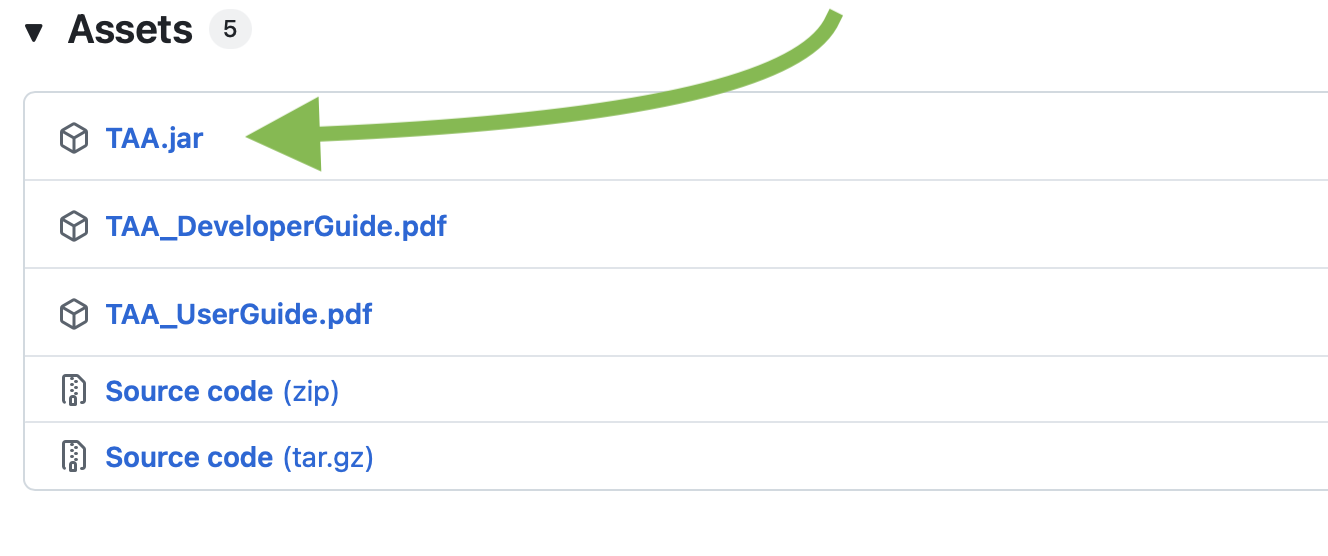
- Download the latest version of the app (called
TAA.jar) from our GitHub page here:
- Move
TAA.jarinto a new folder used to contain the app's data. We recommend naming this folder "TAA" and putting it in your Downloads folder.
- To launch TAA, open a command terminal and follow the instructions for your Operating System:
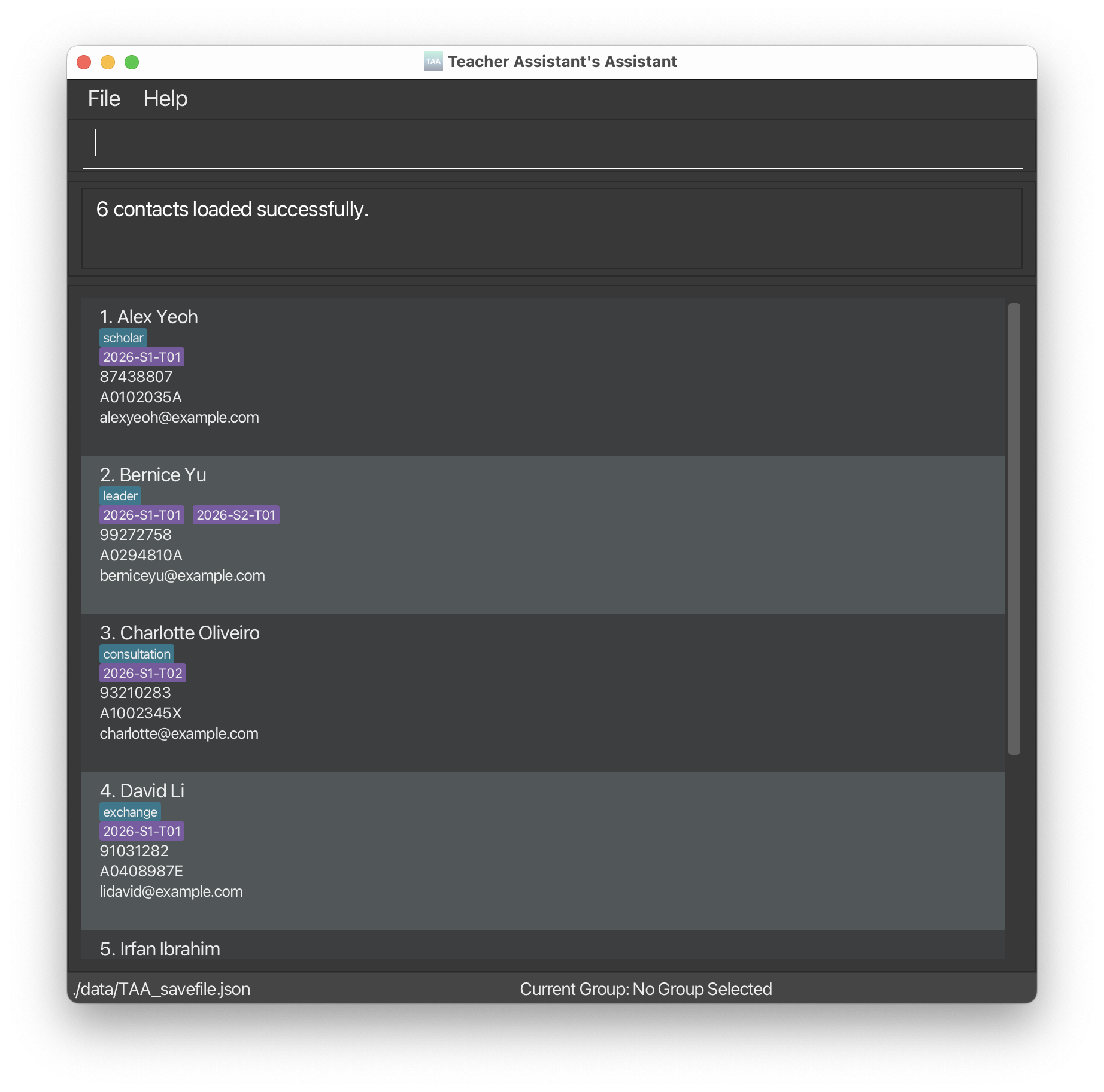
You should see TAA launch:
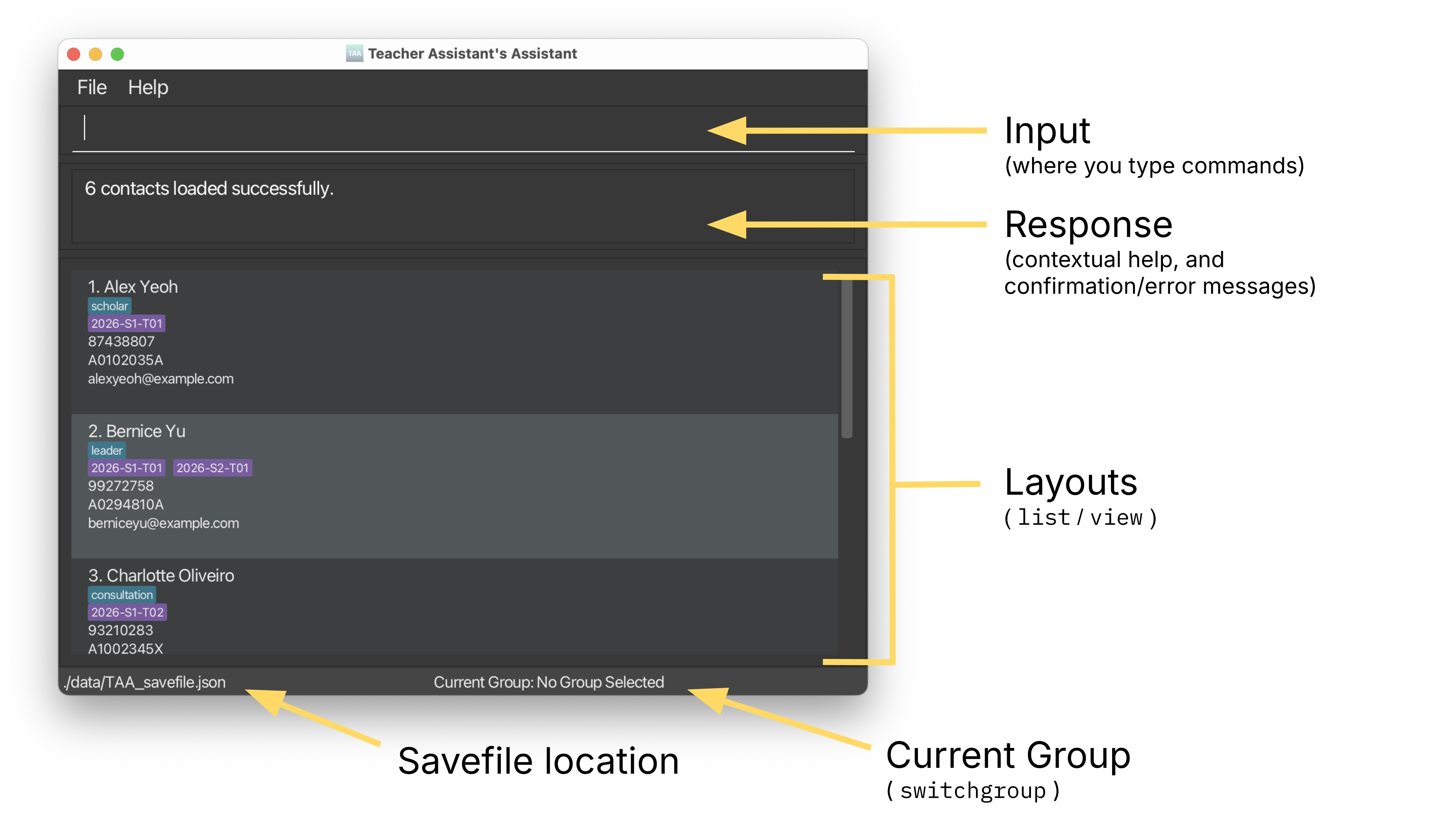
Here is a brief overview of the user interface:
Once TAA is running, you can start by learning about the app's Core Concepts to understand what the app can do. Then, continue onto the Recommended Workflows how see how the app can fit into your workflows.
You can refer to the Features section for detailed command documentation.
Finally, to clear all existing demo data and begin your use of TAA, run clear.
Core Concepts
Before diving into features, let's learn how TAA organises your data.
Students vs Session Data
TAA manages two types of information:
- Static information (per student):
- Name, phone, email, matric number, tags
- Used for identifying and contacting students
- Session-based information (per group, per date):
- Attendance
- Participation
- Assignment grades
👉 This means a student can have different attendance, participation, and grades across different groups and dates.
Groups as Context
Most actions in TAA happen within a group context.
- You switch into a group using:
switchgroup g/GROUP_NAME
- Then perform actions like:
mark,unmark(attendance)part(participation)view(session overview)createassignment,gradeassignment
👉 Think of it as: “I am currently working in this group.”
Layouts Control What You See and Edit
TAA has different layouts:
list→ shows a list of students in the current groupview→ shows an overview of attendance and participation across sessions
👉 Important:
- Commands act on what is currently displayed
- Always check your current group before running commands (shown bottom right of the app)
Index-based Operations
Many commands use i/INDEX or i/INDEX_EXPRESSION.
- Indexes change depending on your current group
👉 Tip: Run list or view before using index-based commands to avoid mistakes.
Recommended Workflows
Here are some common workflows that TAA supports.
Adding and organizing students
- Add students:
add n/John Doe p/98765432 e/johnd@example.com m/A1234567X
- Create a group:
creategroup g/2026-S1-T01
- Add students to the group:
addtogroup g/2026-s1-t01 i/1-5
Note how group names can be specified case-insensitively for convenience.
Taking attendance for a class
- Switch to the group:
switchgroup g/2026-s1-t01
- Open or focus on a session:
view d/2026-03-16
- Mark students as present:
mark i/1-10
- Mark absentees:
unmark i/3
Recording participation
After opening a session:
part i/1 pv/4
- Participation values range from 0 to 5
Managing assignments
- Create an assignment:
createassignment a/Quiz 1 d/2026-04-05 mm/20
Type createa and press TAB on your keyboard to autocomplete commands.
- Grade students:
gradeassignment a/Quiz 1 i/1-5 gr/18
Exporting data
Export the current session view to a CSV file:
exportview f/t01-view.csv
General usage pattern
Most workflows follow this pattern:
- Select a group
- Open a view (
listorview) - Perform actions using indexes
👉 If something doesn’t work, check that you're in the right Group
Command Parameters and their Rules
This section describes the valid formats for commonly used fields in TAA commands.
You don't need to memorise everything — refer back here if a command fails due to invalid input.
Info:
Words in
UPPER_CASEare the parameters to be supplied by the user.
e.g.NAMEinadd n/NAMEis a parameter which can be used likeadd n/John DoeParameters can be in any order.
e.g. if the command specifiesn/NAME p/PHONE,p/PHONE n/NAMEis also acceptableItems in square brackets are optional.
e.gn/NAME [t/TAG]can be used asn/John Doe t/scholaror asn/John DoeItems with
… after them can be used multiple times including 0 times.
e.g.[t/TAG]…can be used ast/scholarort/scholar t/exchangeStudentAdditional parameters for commands that do not take in parameters (such as
help,list,exitandclear) will be ignored.
e.g.help 123will runhelpWhen using the PDF version of this User Guide, be careful when copy-pasting commands with multiple lines as spaces across lines might be omitted.
Index Expressions
Many commands in TAA accept an i/INDEX or i/INDEX_EXPRESSION parameter to refer to one or more students. The index refers to the position shown in the current list or view.
Supported formats:
INDEX- Single index:
i/1
- Single index:
INDEX_EXPRESSION- Multiple indexes:
i/1,2,4 - Ranges:
i/1-4 - Mixed:
i/1,3-5
- Multiple indexes:
Rules:
- Indexes must be positive integers (1, 2, 3, …)
- Ranges must be in ascending order (
i/3-2is invalid) - Indexes must correspond to valid entries in the current
list/view
Name
- Cannot start or end with:
- space, apostrophe (
'), hyphen (-), or forward slash (/)
- space, apostrophe (
- Allowed characters:
- Letters (including Unicode, e.g.
ã,é,ç) - Numbers
- Spaces
- Apostrophes, hyphens, forward slashes (with restrictions)
- Letters (including Unicode, e.g.
- Maximum length: 300 characters
Examples:
John DoeMary-Jane O'BrienRenéeX Æ A-Xii
Phone
- Must contain 3 to 20 digits
- May:
- Start with
+ - Include spaces, hyphens, or brackets (for area codes)
- Start with
- Must start and end with a digit
Examples:
98765432+1 (650) 253-0000911
Must follow the format: local-part + @ + domain-name
- Local part:
- Alphanumeric characters and
+,_,.,- - Cannot start or end with special characters
- Alphanumeric characters and
- Domain:
- Labels separated by
. - Each label:
- Alphanumeric, may include hyphens
- Cannot start or end with hyphen
- Final label must be at least 2 characters
- Labels separated by
Examples:
john@example.come1234567@u.nus.edu.sg
Matric Number
- Must follow NUS format:
- Starts with
A - Followed by 7 digits
- Ends with a valid checksum letter
- Starts with
Examples:
A1234567X
Tag
- Alphanumeric characters only
- No spaces
Examples:
scholarexchangeStudent
Tip: A student can have zero or more tags.
Group Name
The g/GROUP_NAME parameter is used to identify tutorial or lab groups.
Allowed characters:
- Letters (A–Z, a–z)
- Numbers (0–9)
- Spaces
- Hyphens (
-) - Underscores (
_)
Rules:
- Must not start with a hyphen (
-) or underscore (_), such as:-T09_T09
Examples:
T01CS2103T T09Lab_Group_1
Tip: If the group name field is optional for that command, supplying it acts as a shortcut for the switchgroup command.
Max Marks and Grade
The mm/MAX_MARKS parameter refers to the maximum marks (grade) for an Assignment.
- Allowed value: A whole number from 1 to 2147483647 (this number is the technical limit)
The gr/GRADE parameter refers to the grade (marks) for an Assignment given to a Student.
- Allowed value: A 3-decimal-place number from 0 to MAX_MARKS
Feature: Managing Students
Remember that Fields (e.g. NAME, PHONE, EMAIL, etc.) must follow the rules stated in Command Parameters and their Rules.
Adding a student: add
Adds a student to TAA.
Format: add n/NAME p/PHONE e/EMAIL m/MATRIC_NUMBER [t/TAG]…
Examples:
add n/John Doe p/98765432 e/johnd@example.com m/A1234567X t/scholarAdds a student namedJohn Doewith phone number98765432, emailjohnd@example.com, matric numberA1234567X, and one tag namedscholar.
Related FAQs:
Listing student contact details: list
Shows a list of all students in the current group.
Format: list
Examples:
listwhenCurrent Group: T01Shows a list of all the students in groupT01.listwhenCurrent Group: No Group SelectedShows a list of all the students in TAA.
Editing a student: edit
Edits an existing student in the TAA.
Format: edit i/INDEX [n/NAME] [p/PHONE] [e/EMAIL] [m/MATRIC_NUMBER] [t/TAG]…
- At least one of the optional fields must be provided.
- Existing values will be updated to the input values.
- When editing tags, the existing tags of the student will be removed i.e adding of tags is not cumulative.
- You can remove all the student’s tags by typing
t/without specifying any tags after it.
Examples:
edit i/1 p/91234567 e/johndoe@example.comEdits the phone number and email address of the 1st student to be91234567andjohndoe@example.comrespectively.edit i/2 n/Betsy Crower t/Edits the name of the 2nd student to beBetsy Crowerand clears all existing tags.
Related FAQs:
- What is considered a duplicate student?
- What happens when I edit the tags of a student?
- How can I remove all tags from a student?
Locating students by parameters: find
Finds and lists students whose fields match any of the given parameters in the current group.
Format: find [n/NAME]... [p/PHONE]... [e/EMAIL]... [m/MATRIC_NUMBER]... [t/TAG]...
- At least one parameter must be provided.
- The search is case-insensitive. e.g
n/johnwill match the nameJohn - The search lists partial matches. e.g.
n/johnwill match the nameJohn Doe - students matching at least one parameter will be listed (i.e.
ORsearch) though students who match more parameters will be listed first. - Multiple of the same parameter type can be used. e.g.
find n/alex n/davidreturns a list of students with names containingalexordavid
Examples:
find n/johnReturns students with the namesjohnandJohn Doe.find n/john p/987 e/example.com m/123 t/scholarReturns students with a name containingjohn, a phone number containing987, an email containingexample.com, a matric number containing123or a tag containingscholar.find n/alex n/davidReturns the studentsAlex Yeoh,David Li.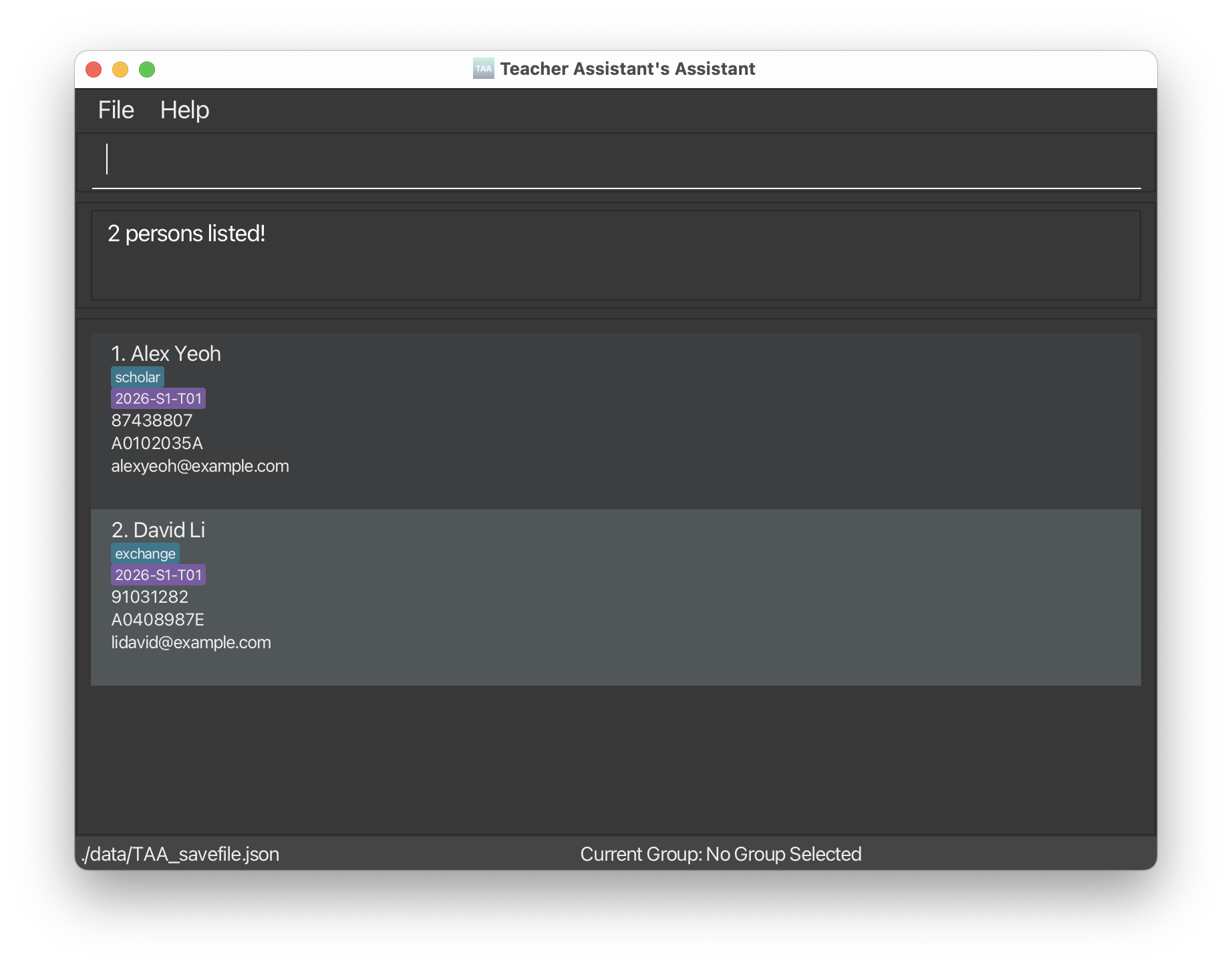
Deleting a student: delete
Deletes the specified student from TAA.
Format: delete i/INDEX
Examples:
listfollowed bydelete i/2Deletes the 2nd student in the current list.find n/Betsyfollowed bydelete i/1Deletes the 1st student in the result list of thefindcommand.
Feature: Managing Groups
Group names are case-insensitive. For example, 2026-S1-T01 and 2026-s1-t01 refers to the same group.
Creating a group: creategroup
Adds a tutorial group to TAA.
Format: creategroup g/GROUP_NAME
- Group names may only contain letters, numbers, spaces, hyphens, and underscores.
- Hyphens and underscores cannot appear at the start of the group name.
- Example:
g/-T09andg/_T09are invalid group names.
Examples:
creategroup g/T01Creates the groupT01.
Tip: Use a consistent group-naming format that matches how you organize your classes.
For example: 2024-S1-T02 or 2025-S2-T02.
Deleting a group: deletegroup
Deletes a tutorial group from TAA.
Format: deletegroup g/GROUP_NAME
Examples:
deletegroup g/T01Deletes the groupT01.
Info: This only deletes the group. Your students that were in the group will still remain in TAA, but will no longer be part of that group.
Warning: When a group is deleted, its assignments and grades are deleted too.
Listing all groups: listgroups
Shows a list of all groups in TAA.
Format: listgroups
Examples:
listgroupswhen inCurrent Group: T01orCurrent Group: No Group Selectedshows a list of all the groups in TAA.
Add students to group: addtogroup
Adds one or more students to a group. Students can be identified either by matric number or index expression.
Format:
addtogroup g/GROUP_NAME m/MATRIC_NUMBER [m/MATRIC_NUMBER]addtogroup g/GROUP_NAME i/INDEX_EXPRESSION
Examples:
addtogroup g/T01 m/A1234567X m/A2345678LAdds students with matric numberA1234567XandA2345678Lto groupT01.addtogroup g/Project Team i/1,3,5,7Adds students at indexes 1, 3, 5, and 7 from the current list to groupProject Team.
Remove student from group: removefromgroup
Removes one or more students from a group. Students can be identified either by matric number or index expression. This only removes the student’s membership from the group, not the student from the TAA.
Format:
removefromgroup g/GROUP_NAME m/MATRIC_NUMBER [m/MATRIC_NUMBER]removefromgroup g/GROUP_NAME i/INDEX_EXPRESSION
Examples:
removefromgroup g/T01 m/A1234567X m/A2345678LRemoves students with matric numberA1234567XandA2345678Lfrom groupT01.removefromgroup g/Project Team i/1,3,5,7Removes students with the index 1, 3, 5, 7 from the list in the current groupProject Team.
Rename group: renamegroup
Changes the name of a group.
Format: renamegroup g/OLD_GROUP_NAME new/NEW_GROUP_NAME
Examples:
renamegroup g/T01 new/Tutorial-01Renames groupT01toTutorial-01.
Info: When a group is renamed, its assignments and grades stay attached.
Switching groups: switchgroup
Switches into or out of a group.
Format:
switchgroup g/GROUP_NAMEswitchgroup all
Examples:
switchgroup g/T01Switches current group toT01switchgroup allSwitches out of the current group (i.e. No Group Selected).
Feature: Managing Attendance and Participation
Info:
You must first switch to a group using switchgroup g/GROUP_NAME before using the part, mark, unmark or view commands.
Assign participation to a student: part
Assigns a participation level for a student in a group for a particular date.
Format: part i/INDEX_EXPRESSION d/YYYY-MM-DD pv/PARTICIPATION_VALUE
PARTICIPATION_VALUEmust be an integer from 0 to 5.- The participation will be assigned for the current group.
Examples:
part i/1 d/2026-03-16 pv/4Assigns a participation level of 4 on the 16 of March 2026 for the student at index 1 for the current list.
Tip:
TAA allows assigning participation value for absent students.
For example, to account for take-home assignments.
Mark student attendance as present: mark
Marks the attendance for a student in a group as PRESENT for a particular date.
Format: mark i/INDEX_EXPRESSION d/YYYY-MM-DD
- The attendance will be assigned for the current group.
Examples:
mark i/1 d/2026-03-16Marks the attendance of the student at index 1 of the current list as PRESENT for the 16 of March 2026.
Tip:
TAA allows marking attendance for future sessions.
For example, you can mark a student on long-term medical leave as absent, or mark the whole class present in advance and adjust on the actual day.
Mark student attendance as absent: unmark
Marks the attendance for a student in a group as ABSENT for a particular date.
Format: unmark i/INDEX_EXPRESSION d/YYYY-MM-DD
- The attendance will be assigned for the current group.
Examples:
unmark i/1 d/2026-03-16Marks the attendance of the student at index 1 of the current list as ABSENT for the 16 of March 2026.
Tip:
TAA does not automatically mark students as ABSENT when a session's date passes.
You must mark absences manually with the unmark command.
See overview of attendance and participation: view
Shows the attendance and participation overview for the current group.
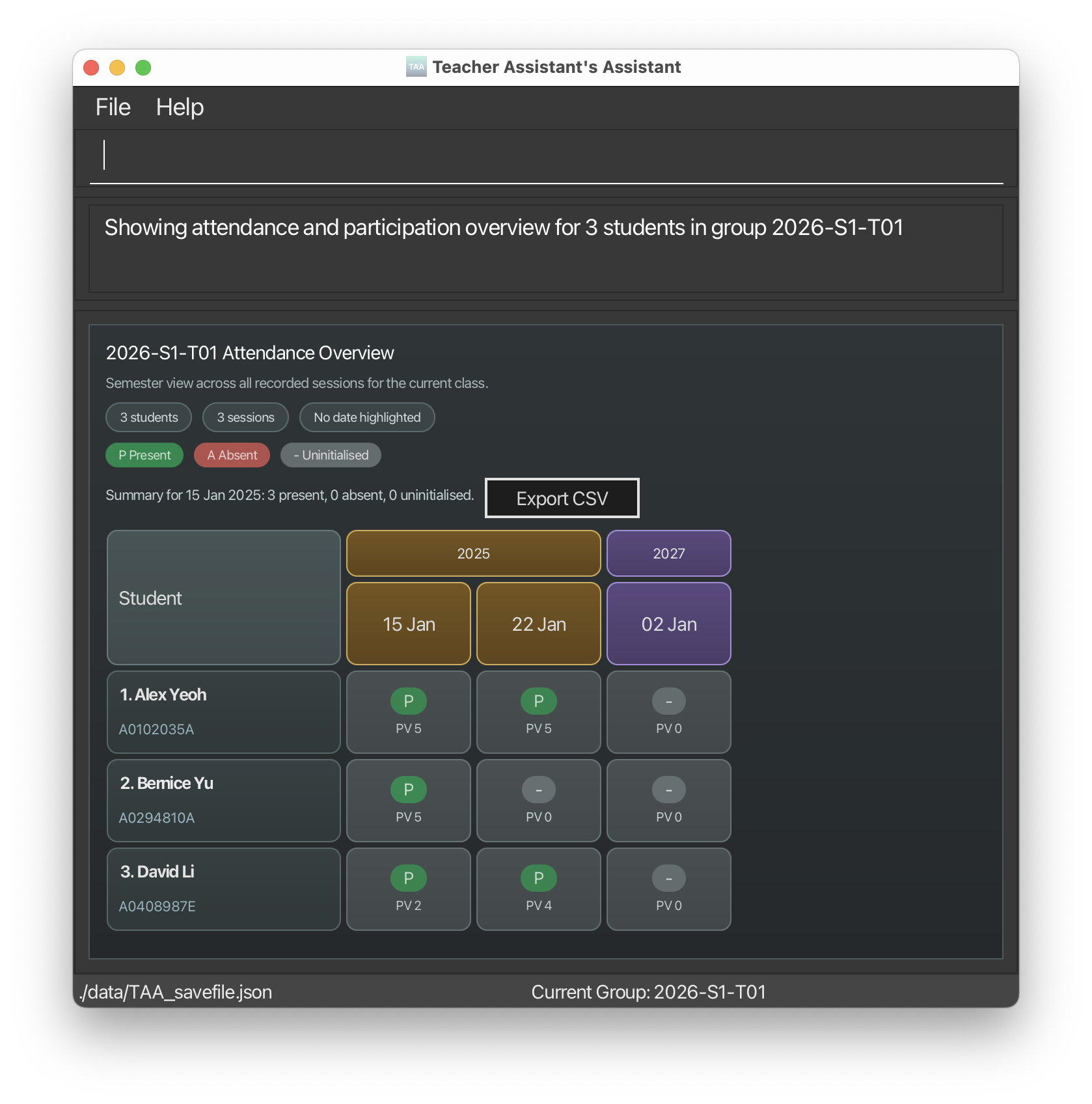
Format: view [STATUS] [d/YYYY-MM-DD] [from/YYYY-MM-DD] [to/YYYY-MM-DD] [g/GROUP_NAME]
Tip: You can supply [g/GROUP_NAME] as a shortcut to switchgroup.
After using view d/YYYY-MM-DD, you can use shorthand follow-up commands without repeating the date or group:
mark i/1unmark i/1part i/1 pv/4
You can still use the full forms if needed:
mark i/1 d/2026-03-16unmark i/1 d/2026-03-16part i/1 d/2026-03-16 pv/4
Examples:
viewShows the semester overview of attendance and participation for the current group.view d/2026-03-16Highlights the session on 16 March 2026.view absent d/2026-03-16Shows the list of students who have the attendance status ABSENT on 16 March 2026 for the current group.view from/2026-03-01 to/2026-03-31Shows only March 2026 session columns in the overview.
Tips:
By default (no STATUS specified in command), the overview will show:
- Attendance status as
[ ] Absent,[X] Present,[-] Uninitialised. - Class participation scores.
You can optionally narrow the visible session columns with a date range:
from/sets the earliest visible session date.to/sets the latest visible session date.- Both
from/andto/can be used together:- Example:
view from/2026-01-20 to/2026-01-30Shows the session columns from 20 January 2026 to 30 January 2026. from/cannot be later thanto/.
- Example:
Feature: Managing Assignments
Info:
Assignments can only be managed after you switch to a specific group using switchgroup g/GROUP_NAME.
You will not be able to run assignment-related commands outside a group.
Tip: Assignment names are case-insensitive. For example: Assignment 1 and assignment 1 are treated as the same.
Create assignment: createassignment (createa)
Creates an assignment for students in the current group with a due date and maximum marks.
Format:
createassignment a/ASSIGNMENT_NAME d/DUE_DATE mm/MAX_MARKS
Notes:
- Assignments are unique within a group. The same assignment name can exist in different groups.
- When a student is added to a group, all existing group assignments will automatically be shown as ungraded for that student.
Examples:
createassignment a/Quiz 1 d/2026-04-05 mm/20Creates assignmentQuiz 1for the current group with a due date on 5 April 2026 and maximum marks of 20.
Warning: When a student is removed from a group, their grades for that group’s assignments are removed.
Edit assignment: editassignment (edita)
Edits an existing assignment for students in the current group .
Format:
editassignment a/ASSIGNMENT_NAME [na/NEW_ASSIGNMENT_NAME] [d/NEW_DUE_DATE] [mm/NEW_MAX_MARKS]
Note: At least one optional field should be provided.
Examples:
editassignment a/Quiz 1 na/Test d/2026-04-08 mm/25Changes existing assignmentQuiz 1for the current group to have a nameTest, a due date on 8 April 2026 and maximum marks of 25.
Listing all assignments: listassignments (lista)
Shows a list of all assignments for the current group.
Format:
listassignmentswhenCurrent Group: T01shows a list of the assignments for the groupT01.
Grade assignment: gradeassignment (gradea)
Grades an assignment for students in the current group.
Format:
gradeassignment a/ASSIGNMENT_NAME i/INDEX_EXPRESSION gr/GRADEgradeassignment a/ASSIGNMENT_NAME m/MATRIC_NUMBER [m/MATRIC_NUMBER] gr/GRADE
Notes:
GRADEis a number between 0 and max marks.- Grading again overwrites the old grade.
Examples:
gradeassignment a/Quiz 1 m/A1234567X m/A2345678L gr/17Assigns a grade of 17 for the assignmentQuiz 1to the students with matric numberA1234567XandA2345678Lfor the current group.
Deleting an assignment: deleteassignment (deletea)
Deletes an assignment for the students in the current group.
Format:
deleteassignment a/ASSIGNMENT_NAME
Examples:
deleteassignment a/Quiz 1Deletes the assignmentQuiz 1for all students in the current group.
Feature: Managing Sessions
Add a session: addsession
Adds a session for the current group or a specified group.
Format: addsession d/YYYY-MM-DD [g/GROUP_NAME] [n/NOTE]
- Adds a session with specified date for all students in the group.
- New sessions start with
UNINITIALISEDattendance and participation value of0. - You can optionally attach a short note such as
tutorial,lab, ormake-up. - If the session already exists for every student in that class, the command will be rejected.
Examples:
addsession d/2026-03-16WhenCurrent Group: T01, adds a session of date 16 March 2026 for groupT01.addsession d/2026-03-16 n/tutorialWhenCurrent Group: T01, adds a session of date 16 March 2026 with a note oftutorialfor groupT01.addsession d/2026-03-16 g/T01WhenCurrent Group: No Group Selected, adds a session of date 16 March 2026 for groupT01.
Edit a session date: editsession
Edits an existing session's date, note, or both for the current group or a specified group.
Format: editsession d/OLD_DATE [nd/NEW_DATE] [nn/NEW_NOTE] [g/GROUP_NAME]
- At least one of
nd/ornn/must be provided. - Use
nn/with no text after it to clear the existing note. - Editing a session preserves the student's attendance and participation values.
- If a session already exists on the new date for the same student, the command will be rejected to avoid overwriting data.
Examples:
editsession d/2026-03-16 nd/2026-03-23WhenCurrent Group: T01, edits the date of the session for 16 March 2026 and changes it to 23 March 2026 for groupT01.editsession d/2026-03-16 nn/labWhenCurrent Group: T01, edits the note of the session for 16 March 2026 tolab.editsession d/2026-03-16 nd/2026-03-23 nn/make-up tutorialWhenCurrent Group: T01, edits the date of the session for 16 March 2026 and changes it to 23 March 2026 and adds a notemake-up-tutorialfor groupT01.editsession d/2026-03-16 nd/2026-03-23 g/T01WhenCurrent Group: No Group Selected, edits the date of the session for 16 March 2026 and changes it to 23 March 2026 for groupT01.
Delete a session: deletesession
Deletes a session for the current group or a specified group.
Format: deletesession d/YYYY-MM-DD [g/GROUP_NAME]
- Removes that date's session (and attendance/participation) across all students in the group.
- If
g/GROUP_NAMEis omitted, the session is deleted from the current group. - If the deleted date is currently highlighted in
view, the highlight is cleared.
Examples:
deletesession d/2026-03-16WhenCurrent Group: T01, deletes the session of date 16 March 2026 for groupT01.deletesession d/2026-03-16 g/T01WhenCurrent Group: No Group Selected, deletes the session of date 16 March 2026 for groupT01.
Utility commands
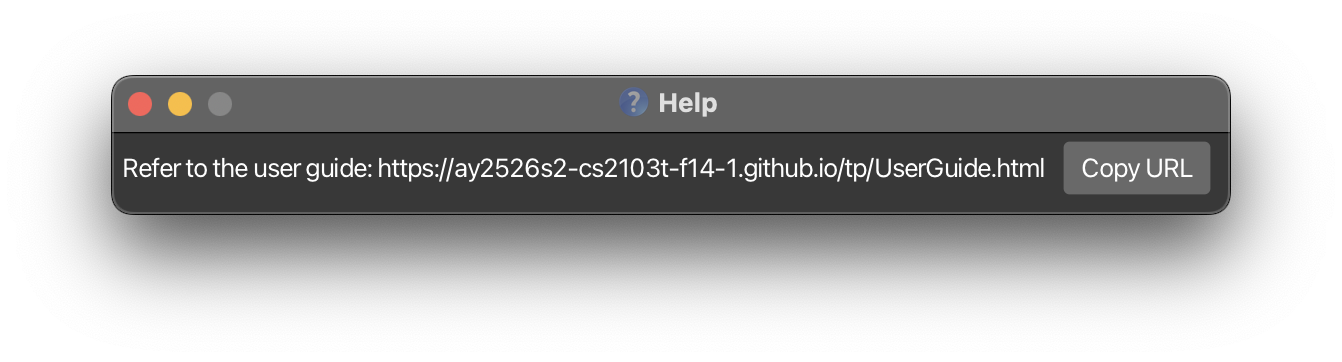
Viewing help: help
Shows a message explaining how to access the help page.
Format: help
Clearing all entries: clear
Clears all entries from TAA. This includes all students, groups, assignments and sessions.
Format: clear
Examples:
clearwhenCurrent Group: T01orCurrent Group: No Group Selecteddeletes all entries from TAA, regardless of view.
Export the current session overview: exportview
Info: This command only works when you are in a group.
Exports the currently displayed view matrix to a CSV-formatted file.
Format: exportview [f/FILE_NAME]
- The exported CSV file contains the students shown in the current session overview.
- If no file name is provided, TAA will write to
[JAR file location]/view-export.csv. - If a file name is provided, TAA will write to
[JAR file location]/[FILE_NAME]
Examples:
exportviewWhenCurrent Group: T01, exports to a file namedview-export.csvcontaining the sessions, attendance and participation values for groupT01.exportview f/exports/t01-view.csvWhenCurrent Group: T01, exports to a file namedt01-view.csvin a folderexportscontaining the sessions, attendance and participation values for groupT01.
For an example of the exported CSV structure, refer to the CSV file format section below.
Warning:
If you provide a file name, you will need to append .csv to the end.
TAA will not automatically append .csv at the back of your given file name.
CSV file format
The exported CSV file contains the students shown in the current session overview.
Each row represents one student.
The columns are arranged as follows:
- The first column is
Student. - The remaining columns are grouped by date.
- For each date, there are two columns:
<date> Attendance<date> Participation
Example:
| Student | 2026-04-01 Attendance | 2026-04-01 Participation |
|---|---|---|
| John Doe | PRESENT | 0 |
| Philip Cap | PRESENT | 0 |
| Brendan Tan | ABSENT | 0 |
Warnings:
If you export again to the same file path, the existing file will be overwritten. If you want to keep an older export, save it to a different location or rename the file before exporting again.
Avoid illegal filename characters such as
:,*,?,",<,>, and|in FILE_NAME, and only use/or\for the filepath. TAA will reject file names containing these characters and ask you to choose a different name.
Exiting the program: exit
Exits the program.
Format: exit
Managing your data and save file
Saving the data
Your data will be saved automatically as a JSON file [JAR file location]/data/TAA_savefile.json after any command that changes the data.
You do not need to save any changes manually.
Editing the save file
You are welcome to update data directly by editing the TAA_savefile.json save file.
You are recommended to back up your data before beginning.
You can edit the save file using pre-installed text editors found on your computer:
- Windows: Notepad
- MacOS: TextEdit
- Linux: gedit
Warning: You should follow the format below closely to prevent an invalid save file.
{
  "persons" : [ {
    "name" : "NAME",
    "phone" : "PHONE",
    "email" : "EMAIL",
    "matricNumber" : "MATRIC_NUMBER",
    "tags" : [ "TAGS" ],
    "groups" : [ "GROUP_NAME" ],
    "groupSessions" : {
      "GROUP_NAME" : [ {
        "date" : "YYYY-MM-DD",
        "attendance" : "ATTENDANCE_STATUS",
        "participation" : PARTICIPATION_VALUE,
        "note" : "NOTE"
      } ]
    },
    "assignmentGrades" : {
      "GROUP_NAME" : {
        "ASSIGNMENT_NAME" : ASSIGNMENT_MARKS (this field must be less than or equal to MAX_MARKS)
      }
    }
  } ],
  "groups" : [ {
    "name" : "GROUP_NAME",
    "assignments" : [ {
      "name" : "ASSIGNMENT_NAME",
      "dueDate" : "YYYY-MM-DD",
      "maxMarks" : MAX_MARKS
    } ],
    "sessions" : [ {
      "date" : "YYYY-MM-DD",
      "attendance" : "UNINITIALISED", (this field should be kept at "UNINITIALISED")
      "participation" : 0, (this field should be kept at 0)
      "note" : ""
    } ]
  } ]
}
Tip:
If your changes to the save file makes it invalid, TAA will not load your students and will not overwrite your save file.
You should close TAA and manually fix the save file before continuing your use of the app, as any changes you make will not be saved.
Related FAQs:
- How do I back up my data?
- How do I transfer my data to another computer?
- What is considered a duplicate student?
- I edited the save file manually and TAA no longer works. What should I do?
- I see
preservedSkippedPersons,preservedSkippedGroupsandloadWarningsin my save file. What are they? - What happens if my manually edited students are invalid?
- What happens if my manually edited groups are invalid?
Command Summary
| Action | Formats and Examples |
|---|---|
| Add | add n/NAME p/PHONE e/EMAIL m/MATRIC_NUMBER [t/TAG]… e.g., add n/James Ho p/22224444 e/jamesho@example.com m/A1234567X t/scholar |
| Add to Group | addtogroup g/GROUP_NAME m/MATRIC_NUMBER [m/MATRIC_NUMBER] addtogroup g/GROUP_NAME i/INDEX_EXPRESSION e.g., addtogroup g/T01 m/A1234567X m/A2345678L |
| Add Session | addsession d/YYYY-MM-DD [g/GROUP_NAME] [n/NOTE] e.g., addsession d/2026-03-16 g/T01 n/tutorial |
| Edit Session | editsession d/OLD_DATE [nd/NEW_DATE] [nn/NEW_NOTE] [g/GROUP_NAME] e.g., editsession d/2026-03-16 nd/2026-03-23 nn/lab g/T01 |
| View Attendance/Participation | view [STATUS] [d/YYYY-MM-DD] [from/YYYY-MM-DD] [to/YYYY-MM-DD] [g/GROUP_NAME] e.g., view absent d/2026-03-16 |
| Export View | exportview [f/FILE_NAME] e.g., exportview f/exports/t01-view.csv |
| Clear | clear |
| Create Assignment | createassignment a/ASSIGNMENT_NAME d/DUE_DATE mm/MAX_MARKS createa a/ASSIGNMENT_NAME d/DUE_DATE mm/MAX_MARKS e.g., createassignment a/Quiz 1 d/2026-04-05 mm/20 |
| Create Group | creategroup g/GROUP_NAME e.g., creategroup g/T01 |
| Delete | delete i/INDEXe.g., delete i/3 |
| Delete Assignment | deleteassignment a/ASSIGNMENT_NAME deletea a/ASSIGNMENT_NAME e.g., deleteassignment a/Quiz 1 |
| Delete Group | deletegroup g/GROUP_NAME e.g., deletegroup g/T01 |
| Delete Session | deletesession d/YYYY-MM-DD [g/GROUP_NAME] e.g., deletesession d/2026-03-16 g/T01 |
| Edit | edit i/INDEX [n/NAME] [p/PHONE] [e/EMAIL] [m/MATRIC_NUMBER] [t/TAG]… e.g., edit i/2 n/James Lee e/jameslee@example.com |
| Edit Assignment | editassignment a/ASSIGNMENT_NAME [na/NEW_ASSIGNMENT_NAME] [d/NEW_DUE_DATE] [mm/NEW_MAX_MARKS] edita a/ASSIGNMENT_NAME [na/NEW_ASSIGNMENT_NAME] [d/NEW_DUE_DATE] [mm/NEW_MAX_MARKS] e.g., editassignment a/Quiz 1 na/Test d/2026-04-08 mm/25 |
| Exit | exit |
| Find | find [n/NAME]... [p/PHONE]... [e/EMAIL]... [m/MATRIC_NUMBER]... [t/TAG]...e.g., find n/john p/987 e/example.com m/123 t/scholar |
| Grade Assignment | gradeassignment a/ASSIGNMENT_NAME i/INDEX_EXPRESSION gr/GRADE gradeassignment a/ASSIGNMENT_NAME m/MATRIC_NUMBER [m/MATRIC_NUMBER] gr/GRADEgradea a/ASSIGNMENT_NAME i/INDEX_EXPRESSION gr/GRADEgradea a/ASSIGNMENT_NAME m/MATRIC_NUMBER [m/MATRIC_NUMBER] gr/GRADE e.g., gradeassignment a/Quiz 1 m/A1234567X m/A2345678L gr/17 |
| Help | help |
| List | list |
| List Assignment | listassignments lista |
| List Groups | listgroups |
| Mark Attendance | mark i/INDEX_EXPRESSION d/YYYY-MM-DD e.g., mark i/1 d/2026-03-16 |
| Participation | part i/INDEX_EXPRESSION d/YYYY-MM-DD pv/PARTICIPATION_VALUE e.g., part i/1 d/2026-03-16 pv/4 |
| Remove from Group | removefromgroup g/GROUP_NAME m/MATRIC_NUMBER [m/MATRIC_NUMBER] removefromgroup g/GROUP_NAME i/INDEX_EXPRESSION e.g., removefromgroup g/T01 m/A1234567X m/A2345678L |
| Rename Group | renamegroup g/OLD_GROUP_NAME new/NEW_GROUP_NAME e.g., renamegroup g/T01 new/Tutorial-01 |
| Switch Group | switchgroup g/GROUP_NAME switchgroup all e.g., switchgroup g/T01 |
| Unmark Attendance | unmark i/INDEX_EXPRESSION d/YYYY-MM-DD e.g., unmark i/1 d/2026-03-16 |